
 Fork on Github
Data
Variants often need the same data (a menu, a product, a user). Instead of copying it, store it once in a named file under storia/data/ and reference it with the !data tag.
# storia/data/menu.yaml
items:
    - { label: Home, url: / }
    - { label: Shop, url: /shop }
# storia/components/header.yaml
component: Header
variants:
default:
args:
menu: !data menu# storia/pages/home/home.yaml
variants:
default:
args:
menu: !data menu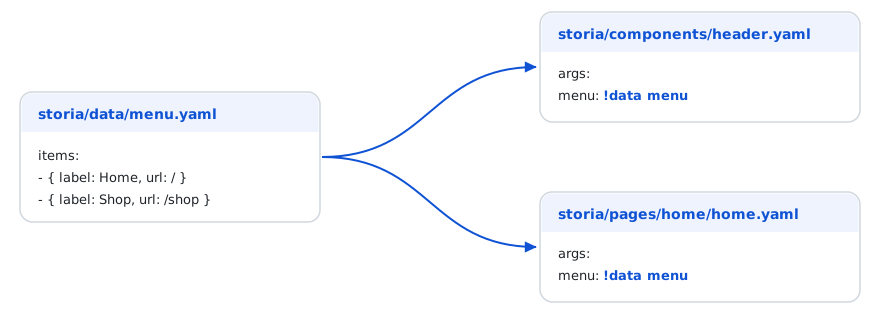
Changing storia/data/menu.yaml updates every view that uses it. Files in storia/data/ are not views: they do not appear in the navigation.
Sub-paths
Sub-folders are part of the name (!data shop/catalog), and a dotted path reaches inside the file: !data menu.items.0 or !data shop/product.default.price.
Variants of a piece of data
A file can hold several entries, and with overrides some of their values (mappings are merged, lists are replaced):
# storia/data/product.yaml
default: { name: Chair, price: 49, inStock: true }
expensive: !data { ref: product.default, with: { price: 999 } }
sold_out: !data { ref: product.default, with: { inStock: false } }
Repeating an item: !repeat
!repeat builds a list from a template; {i} is replaced by the position (starting at 1) in every string of the item.
products: !repeat
    count: 4
    item:
        name: 'Product {i}'
        price: 19.99
Filler text: !lorem
!lorem generates a deterministic placeholder text, so the output is stable between two renderings: !lorem 12 (words), !lorem 2 sentences, !lorem 1 paragraph. It works in args and in blocks.
blocks:
    content: !lorem 3
Inside a !repeat, each item gets a different text, so a list of cards does not repeat the same sentence:
articles: !repeat
    count: 3
    item:
        title: !lorem 4
        summary: !lorem 2 sentences
PHP data providers
When the data needs logic (relative dates, computed values, business objects), use the same tag with a PHP method: !data App\Factory\ProductFactory::createDefault.
Tags are resolved in the args and blocks of a variant, and in the options of a form view.
Argument Resolver
UI Storia provides an Argument Resolver feature that allows you to dynamically generate arguments by calling PHP methods directly from your YAML configuration files.
Instead of hardcoding values in your variant arguments, you can reference a PHP class method with !data ClassName::methodName. UI Storia will call the method to generate the argument value.
How it works
The Argument Resolver supports both:
- Static methods: Called directly on the class
- Instance methods: If the class is registered as a service in the Symfony container, UI Storia will retrieve the service and call the method on it
Example
# storia/components/product.yaml

component: Product
variants:
    default:
        args:
            product: !data App\Factory\ProductFactory::createDefault
        blocks:
            content: ''

    expensive:
        args:
            product: !data App\Factory\ProductFactory::createExpensive
        blocks:
            content: ''

    outOfStock:
        args:
            product: !data App\Factory\ProductFactory::createOutOfStock
        blocks:
            content: ''

    static:
        args:
            product:
                id: 99
                name: Static Product
                price: 19.99
                inStock: true
        blocks:
            content: ''
In this example, the first three variants use the Argument Resolver to call methods from ProductFactory, while the static variant uses hardcoded values.
The ProductFactory class could look like this:
<?php

namespace App\Factory;

class ProductFactory
{
    public static function createDefault(): array
    {
        return [
            'id' => 1,
            'name' => 'Default Product',
            'price' => 29.99,
            'inStock' => true,
        ];
    }

    public static function createExpensive(): array
    {
        return [
            'id' => 2,
            'name' => 'Premium Product',
            'price' => 199.99,
            'inStock' => true,
        ];
    }

    public static function createOutOfStock(): array
    {
        return [
            'id' => 3,
            'name' => 'Sold Out Product',
            'price' => 49.99,
            'inStock' => false,
        ];
    }
}