<?xml version="1.0" encoding="utf-8"?>
<?xml-stylesheet type="text/xsl" href="https://ui-storia.com/xsl/atom.xsl" media="all"?>
<feed xmlns="http://www.w3.org/2005/Atom" xml:lang="en">
  <id>https://ui-storia.com/docs/</id>
  <title>UI Storia - Documentation</title>
  <subtitle><![CDATA[UI Storia is the design-system workbench for Symfony, published as iq2i/storia-bundle by IQ2i and sponsored by Mezcalito.]]></subtitle>
  <link href="https://ui-storia.com/docs/atom.xml" rel="self" type="application/atom+xml" />
  <link href="https://ui-storia.com/docs/" rel="alternate" type="text/html" />
  <updated>2026-10-17T13:32:50+00:00</updated>
  <author>
    <name>Loïc Sapone</name>
    <uri>https://loic-sapone.fr/</uri>
  </author>
  <entry xml:lang="en">
    <id>https://ui-storia.com/docs/ai/</id>
    <title>AI agents</title>
    <published>2026-10-17T13:32:35+00:00</published>
    <link href="https://ui-storia.com/docs/ai/" rel="alternate" type="text/html" />
    <content type="html">
      <![CDATA[<p>The YAML files of the <code translate="no">storia</code> folder are a catalog that a program can read: every component, its variants and its arguments. UI Storia ships a skill for <a href="https://claude.com/claude-code" rel="noopener noreferrer">Claude Code</a>, and any agent that reads Agent Skills, that uses it, so an agent can look at your design system before it writes a template.</p>
<h2 id="two-commands-for-tools">Two commands for tools</h2>
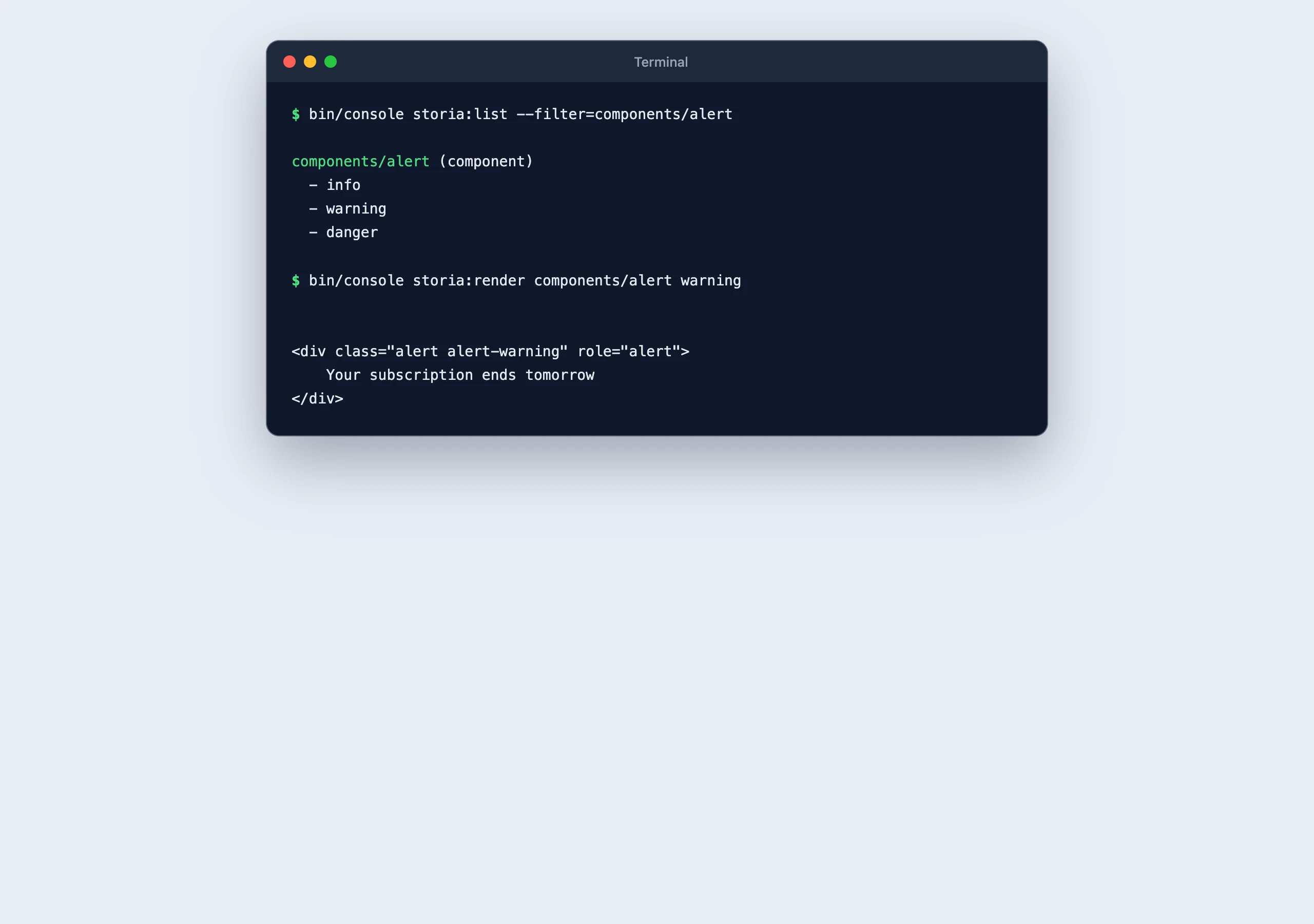
<p>The skill relies on two commands that are also useful in your own scripts.</p>
<pre><code class="language-bash hljs bash" translate="no">bin/console storia:list --format=json</code></pre>
<p>Lists every view with its type (<code translate="no">template</code>, <code translate="no">component</code> or <code translate="no">form</code>), its YAML file, its variants and the resolved arguments of each variant. Use <code translate="no">--filter=components/button</code> or <code translate="no">--filter=components/button:large</code> to narrow the list. Without <code translate="no">--format=json</code>, the output is a readable summary.</p>
<pre><code class="language-bash hljs bash" translate="no">bin/console storia:render components/button plain</code></pre>
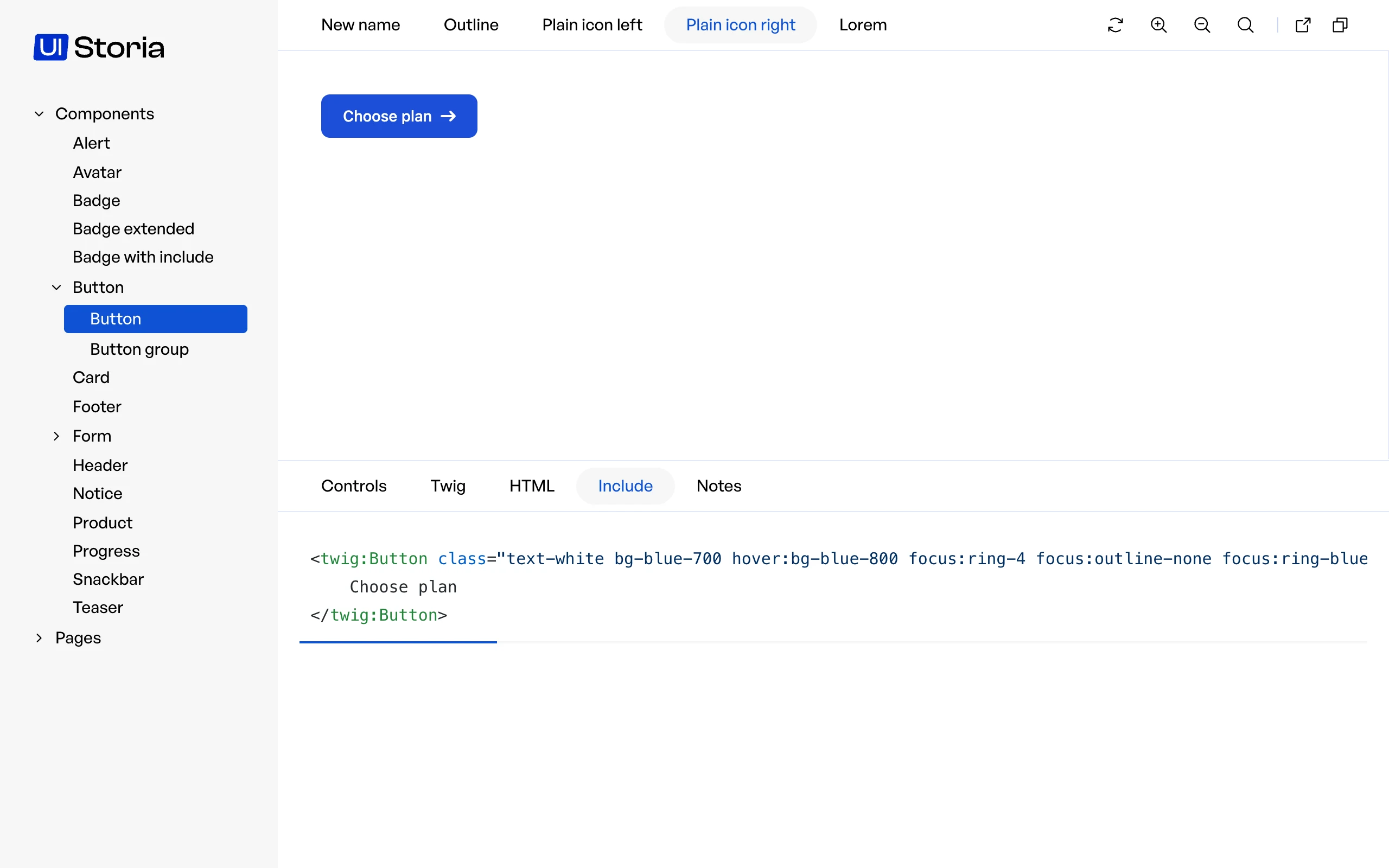
<p>Prints the HTML of a variant on the standard output. <code translate="no">--format=twig</code> prints the source of the template and <code translate="no">--format=include</code> prints the code that includes a component. On error (unknown view or variant, Twig or PHP exception), the message goes to the error output and the exit code is <code translate="no">1</code>.</p>
<img src="/media/ai-output.e2c48719b0de00fcd362f5e7cad4e11e.webp" alt="storia:list and storia:render on the Alert component" loading="lazy" decoding="async" width="2560" height="1800">
<h2 id="mate-tools">Mate tools</h2>
<p>With <a href="https://symfony.com/doc/current/ai/components/mate.html" rel="noopener noreferrer">Symfony Mate</a>, the catalog is also available as tools, called with <code translate="no">vendor/bin/mate tools:call &lt;tool&gt; --&lt;param&gt;=&lt;value&gt;</code>:</p>
<table>
<thead>
<tr>
<th>Tool</th>
<th>Parameters</th>
<th>Result</th>
</tr>
</thead>
<tbody>
<tr>
<td><code translate="no">storia-list</code></td>
<td><code translate="no">filter</code></td>
<td>The views with their type, YAML file, variants and resolved arguments</td>
</tr>
<tr>
<td><code translate="no">storia-render</code></td>
<td><code translate="no">view</code>, <code translate="no">variant</code>, <code translate="no">format</code> (<code translate="no">html</code>, <code translate="no">twig</code> or <code translate="no">include</code>)</td>
<td>What the variant renders</td>
</tr>
<tr>
<td><code translate="no">storia-test</code></td>
<td><code translate="no">filter</code>, <code translate="no">snapshots</code></td>
<td>Whether every variant renders and matches its snapshot, and the output of the command</td>
</tr>
</tbody>
</table>
<p>The tools run the console of your application, <code translate="no">bin/console</code> at the root of the project. Change the path in <code translate="no">mate/config.php</code> when it is elsewhere:</p>
<pre><code class="language-php hljs php" translate="no"><span class="hljs-comment">// mate/config.php</span>
$container-&gt;parameters()-&gt;set(<span class="hljs-string">'ai_mate_storia.console'</span>, <span class="hljs-string">'%mate.root_dir%/app/bin/console'</span>);</code></pre>
<p><code translate="no">storia-test</code> writes the snapshot of a variant that has none, as <code translate="no">storia:test</code> does, and never updates an existing one. The results are wrapped under an <code translate="no">untrusted_data</code> key, as the data comes from your templates.</p>
<h2 id="install-the-skill">Install the skill</h2>
<p>The skill is the <code translate="no">skills/ui-storia</code> folder of the bundle. It follows the <a href="https://agentskills.io" rel="noopener noreferrer">Agent Skills</a> format and is declared in <code translate="no">composer.json</code> for <a href="https://symfony.com/doc/current/ai/components/mate.html" rel="noopener noreferrer">Symfony Mate</a>, which discovers it without any copy.</p>
<h3 id="with-symfony-mate">With Symfony Mate</h3>
<p>Install Mate in your project, then discover the extensions:</p>
<pre><code class="language-bash hljs bash" translate="no">composer require --dev symfony/ai-mate
vendor/bin/mate init
vendor/bin/mate discover</code></pre>
<p>Mate registers the tools of the bundle (see below) and installs its skill as <code translate="no">mate-ui-storia</code> in <code translate="no">.agents/skills</code> and <code translate="no">.claude/skills</code>. It runs the discovery again after each <code translate="no">composer install</code> and <code translate="no">composer update</code>, so the tools and the skill always match the installed version of the bundle. Commit the generated folders to share them with your team. Use <code translate="no">vendor/bin/mate skills:disable ui-storia</code> to turn it off and <code translate="no">vendor/bin/mate skills:override ui-storia</code> to adapt a copy to your project.</p>
<h3 id="without-symfony-mate">Without Symfony Mate</h3>
<p>Copy the folder to your project, or link it, so your agent finds it in <code translate="no">.claude/skills/ui-storia</code>:</p>
<pre><code class="language-bash hljs bash" translate="no">mkdir -p .claude/skills
cp -r vendor/iq2i/storia-bundle/skills/ui-storia .claude/skills/ui-storia</code></pre>
<pre><code class="language-bash hljs bash" translate="no"><span class="hljs-comment"># or keep it in sync with the installed version of the bundle</span>
ln -s ../../vendor/iq2i/storia-bundle/skills/ui-storia .claude/skills/ui-storia</code></pre>
<p>The content of the skill follows the version of the bundle: copy it again after an upgrade, or use the link.</p>
<h2 id="what-the-skill-does">What the skill does</h2>
<ul>
<li>Checks how Storia is installed in the project: configuration, routes, assets of the preview.</li>
<li>Lists the components and variants of the project, and shows what a variant renders.</li>
<li>Knows the format of the YAML files and the <code translate="no">!data</code>, <code translate="no">!repeat</code> and <code translate="no">!lorem</code> tags, so it can create a component and its variants, with the conventions of your project.</li>
<li>Checks a rendering with <code translate="no">storia:render</code>, or in a browser on the iframe URL of the variant.</li>
<li>Runs <code translate="no">storia:test</code> after a change and reads its output.</li>
</ul>
<h2 id="what-it-does-not-do">What it does not do</h2>
<ul>
<li>It does not see the page: it reads HTML and code, not screenshots. It cannot tell you that a component looks wrong.</li>
<li>It does not decide your design. It follows the components and variants that already exist, so a catalog with few variants gives it little to work with.</li>
<li>It does not replace a review of the snapshots: an agent can write a variant and its snapshot, a person still decides that the result is right.</li>
</ul>]]>
    </content>
  </entry>
  <entry xml:lang="en">
    <id>https://ui-storia.com/docs/controls/</id>
    <title>Controls</title>
    <published>2026-10-17T13:32:35+00:00</published>
    <link href="https://ui-storia.com/docs/controls/" rel="alternate" type="text/html" />
    <content type="html">
      <![CDATA[<video autoplay loop muted playsinline controls preload="metadata" poster="/media/controls-poster.webp" aria-label="Editing the title, count, color and alignment of a card in the Controls tab">
    <source src="/media/controls.webm" type="video/webm">
    <source src="/media/controls.mp4" type="video/mp4">
</source></source></video>
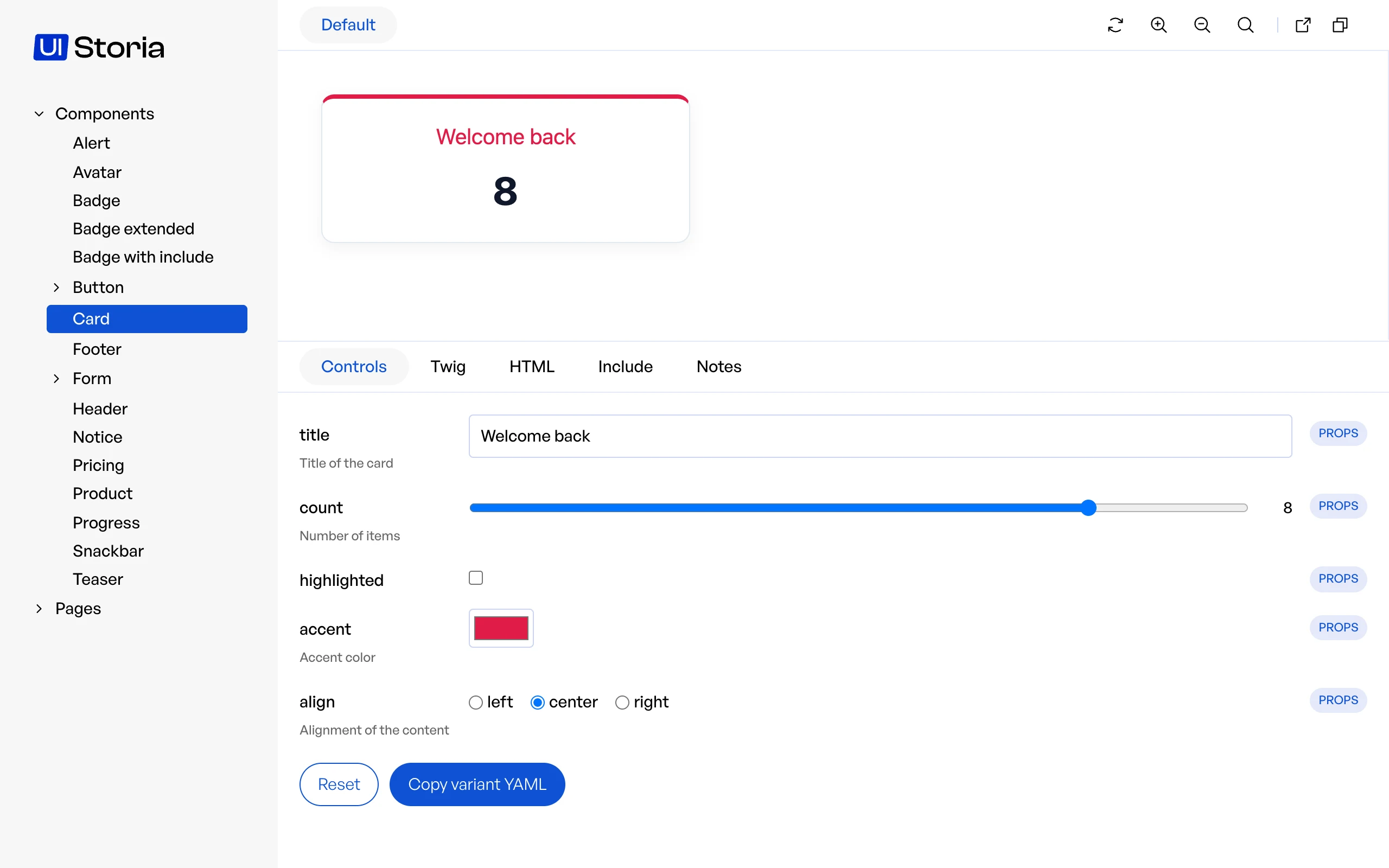
<p>The <strong>Controls</strong> tab, next to Twig, HTML and Include, lets you change the arguments of the current variant and see the result immediately, without editing the YAML file. Controls are deduced automatically:</p>
<table>
<thead>
<tr>
<th>Source</th>
<th>Where the controls come from</th>
</tr>
</thead>
<tbody>
<tr>
<td><code translate="no">props</code></td>
<td>the <code translate="no">{% props %}</code> tag of the component template (names and default values)</td>
</tr>
<tr>
<td><code translate="no">class</code></td>
<td>the public properties and the <code translate="no">mount()</code> parameters of the component PHP class (types, enums)</td>
</tr>
<tr>
<td><code translate="no">types</code></td>
<td>the <code translate="no">{% types %}</code> tag of a page template</td>
</tr>
<tr>
<td><code translate="no">yaml</code></td>
<td>the <code translate="no">args</code> of the variant, typed by their value</td>
</tr>
</tbody>
</table>
<p>A component with <code translate="no">{% props title = 'Card title', count = 3, highlighted = false %}</code> gets three controls, even if its YAML file describes no argument.
An argument written in the YAML file replaces the default value of the prop with the same name.</p>
<p>The widget is deduced from the value or the PHP type:</p>
<table>
<thead>
<tr>
<th>Widget</th>
<th>When</th>
</tr>
</thead>
<tbody>
<tr>
<td><code translate="no">checkbox</code></td>
<td>a boolean</td>
</tr>
<tr>
<td><code translate="no">number</code></td>
<td>an integer or a float</td>
</tr>
<tr>
<td><code translate="no">text</code></td>
<td>a string</td>
</tr>
<tr>
<td><code translate="no">textarea</code></td>
<td>a string with several lines, or longer than 80 characters</td>
</tr>
<tr>
<td><code translate="no">color</code></td>
<td>a string like <code translate="no">#1a2b3c</code></td>
</tr>
<tr>
<td><code translate="no">date</code></td>
<td>a property typed <code translate="no">\DateTimeInterface</code>, <code translate="no">\DateTimeImmutable</code> or <code translate="no">\DateTime</code></td>
</tr>
<tr>
<td><code translate="no">radio</code></td>
<td>a backed enum with 4 cases or fewer</td>
</tr>
<tr>
<td><code translate="no">select</code></td>
<td>a backed enum with more cases</td>
</tr>
<tr>
<td><code translate="no">json</code></td>
<td>an array, edited as JSON</td>
</tr>
</tbody>
</table>
<img src="/media/controls-class.d05ea018f65b22f87b08004d18423e19.webp" alt="Controls deduced from a PHP component: a select, a checkbox and a radio group" loading="lazy" decoding="async" width="2560" height="1600">
<p>Some controls are read-only: a prop whose default value is a Twig expression, an argument that resolves to a PHP object, or an array too large to be edited by hand. They are displayed with a badge explaining why.
<code translate="no">blocks</code> and form types have no controls.</p>
<h2 id="describing-the-controls">Describing the controls</h2>
<p>A <a href="https://twig.symfony.com/doc/3.x/documentation_comments.html" rel="noopener noreferrer">documentation comment</a> above a prop gives the control a description, and can pick its widget with <code translate="no">@control</code>:</p>
<pre><code class="language-twig hljs twig" translate="no"><span class="hljs-template-tag">{% <span class="hljs-name">props</span>
    ## Title of the card
    title = 'Card title',
    ## Number of items @control <span class="hljs-name">range</span> <span class="hljs-name">min</span>=0 <span class="hljs-name">max</span>=10
    count = 3,
    ## Accent color @control color
    accent = '#0f172a',
    ## Alignment of the content @control radio left|center|right
    align = 'left'
%}</span></code></pre>
<p>The same comment works in the docblock of a public property or of a <code translate="no">mount()</code> parameter of a PHP component, and in the <code translate="no">{% types %}</code> tag of a page:</p>
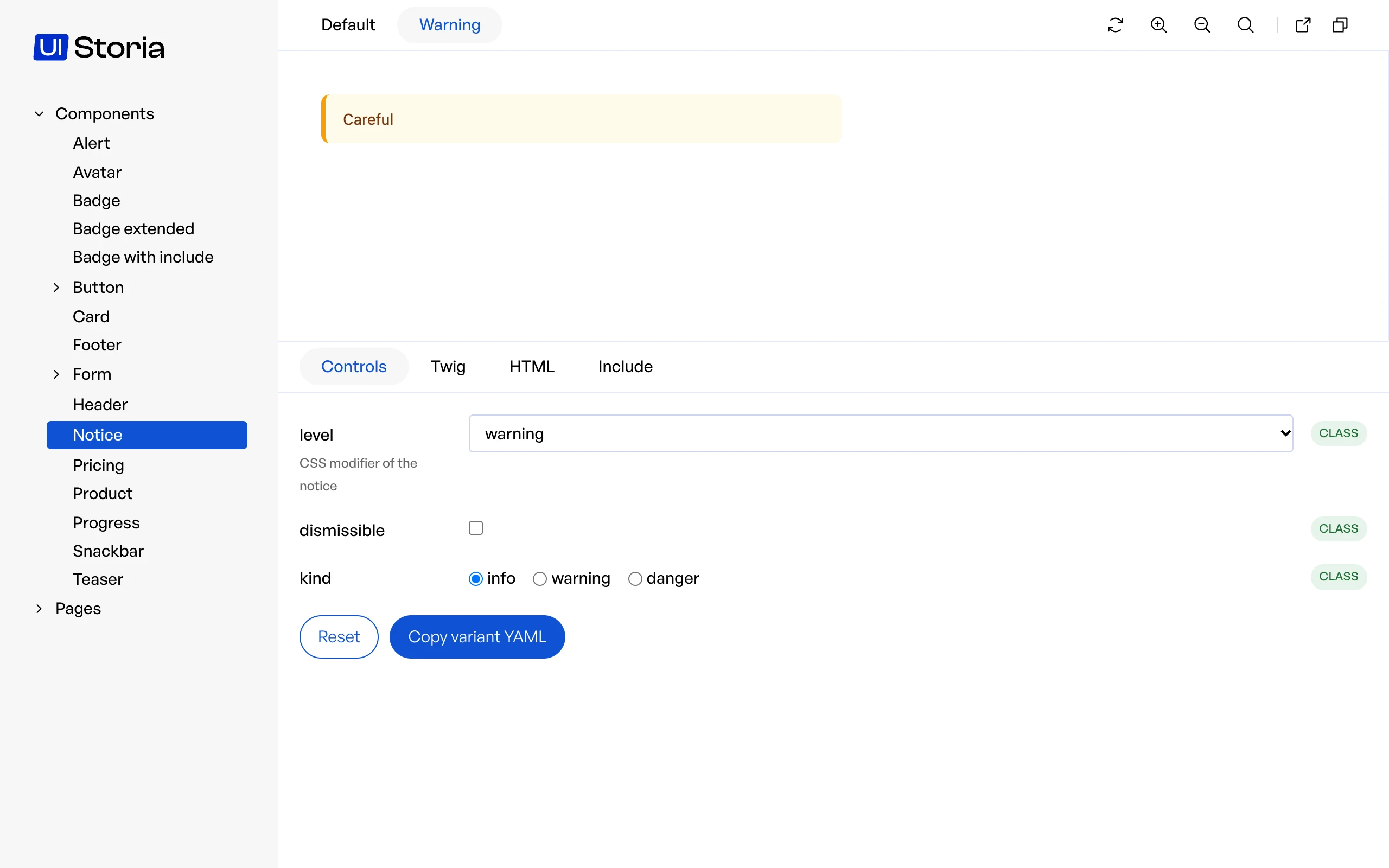
<pre><code class="language-php hljs php" translate="no"><span class="hljs-comment">/** CSS modifier of the notice <span class="hljs-doctag">@control</span> select info|warning|danger */</span>
<span class="hljs-keyword">public</span> string $level = <span class="hljs-string">'info'</span>;

<span class="hljs-comment">/**
 * <span class="hljs-doctag">@param</span> int $delay Seconds before the snackbar closes <span class="hljs-doctag">@control</span> range min=1 max=30
 */</span>
<span class="hljs-keyword">public</span> <span class="hljs-function"><span class="hljs-keyword">function</span> <span class="hljs-title">mount</span><span class="hljs-params">(string $message, int $delay = <span class="hljs-number">5</span>)</span>: <span class="hljs-title">void</span></span></code></pre>
<pre><code class="language-twig hljs twig" translate="no"><span class="hljs-template-tag">{% <span class="hljs-name">types</span> {
    ## Main message of the page @control textarea
    message: 'string',
    ## Number of columns @control <span class="hljs-name">range</span> <span class="hljs-name">min</span>=1 <span class="hljs-name">max</span>=4
    columns?: 'number',
} %}</span></code></pre>
<p><code translate="no">@control</code> accepts <code translate="no">text</code>, <code translate="no">textarea</code>, <code translate="no">color</code>, <code translate="no">date</code>, <code translate="no">number</code>, <code translate="no">range</code> (<code translate="no">min</code>, <code translate="no">max</code> and <code translate="no">step</code> options), <code translate="no">select</code> and <code translate="no">radio</code> (choices separated by <code translate="no">|</code>), <code translate="no">checkbox</code> and <code translate="no">json</code>.
A widget that does not fit the value, such as a <code translate="no">range</code> on a string, is ignored and the control says so.
For an enum, <code translate="no">select</code> and <code translate="no">radio</code> only pick the widget: the choices stay the cases of the enum.</p>
<p>Documentation comments need Twig 3.29: before that version, a <code translate="no">##</code> comment inside a tag is a syntax error, so only write them once your project runs Twig 3.29 or later. Reading them from <code translate="no">{% props %}</code> also needs symfony/ux-twig-component 3.5; with an older version the controls are still deduced, without description nor <code translate="no">@control</code>.</p>
<img src="/media/controls-tab.abe390683e693b7c5495f6c7dc77cae1.webp" alt="The Controls tab after some edits: the changed controls are highlighted" loading="lazy" decoding="async" width="2560" height="1600">
<p>Changes are <strong>never written to disk</strong>. They are kept in the <code translate="no">overrides</code> query parameter of the URL, so reloading the page or sharing the link keeps them, and the <strong>Reset</strong> button removes them.
To keep a state, click <strong>Copy variant YAML</strong> and paste the result in your YAML file. Values coming from <code translate="no">!data</code> or from a PHP data provider are copied once resolved, as literal values.</p>
<p>Overridden values are always passed as plain data, never as Twig code and never through <code translate="no">!data</code> or the argument resolver: a string like <code translate="no">App\Foo::bar</code> stays a string.
However, if your template prints an argument with the <code translate="no">|raw</code> filter, a crafted link can inject HTML in the preview: only open Storia links you trust.</p>
<p>The static export has no controls: the tab only displays a note explaining that they are not available.</p>]]>
    </content>
  </entry>
  <entry xml:lang="en">
    <id>https://ui-storia.com/docs/data/</id>
    <title>Data</title>
    <published>2026-10-17T13:32:35+00:00</published>
    <link href="https://ui-storia.com/docs/data/" rel="alternate" type="text/html" />
    <content type="html">
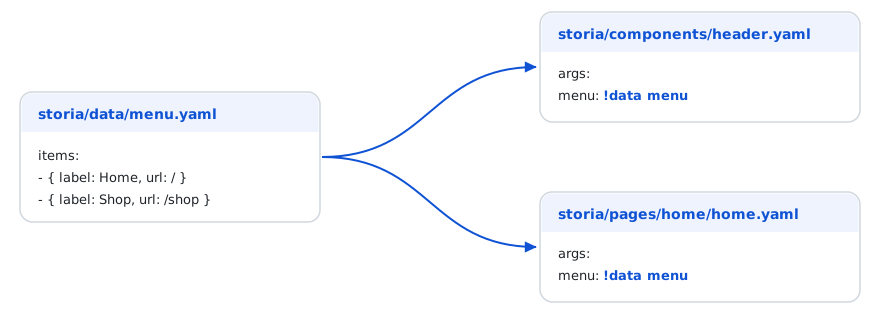
      <![CDATA[<p>Variants often need the same data (a menu, a product, a user). Instead of copying it, store it once in a named file under <code translate="no">storia/data/</code> and reference it with the <code translate="no">!data</code> tag.</p>
<pre><code class="language-yaml hljs yaml" translate="no"><span class="hljs-comment"># storia/data/menu.yaml</span>
<span class="hljs-attr">items:</span>
    <span class="hljs-bullet">-</span> <span class="hljs-string">{</span> <span class="hljs-attr">label:</span> <span class="hljs-string">Home,</span> <span class="hljs-attr">url:</span> <span class="hljs-string">/</span> <span class="hljs-string">}</span>
    <span class="hljs-bullet">-</span> <span class="hljs-string">{</span> <span class="hljs-attr">label:</span> <span class="hljs-string">Shop,</span> <span class="hljs-attr">url:</span> <span class="hljs-string">/shop</span> <span class="hljs-string">}</span></code></pre>
<pre><code class="language-yaml hljs yaml" translate="no"><span class="hljs-comment"># storia/components/header.yaml</span>
<span class="hljs-attr">component:</span> <span class="hljs-string">Header</span>
<span class="hljs-attr">variants:</span>
    <span class="hljs-attr">default:</span>
        <span class="hljs-attr">args:</span>
            <span class="hljs-attr">menu:</span> <span class="hljs-type">!data</span> <span class="hljs-string">menu</span></code></pre>
<pre><code class="language-yaml hljs yaml" translate="no"><span class="hljs-comment"># storia/pages/home/home.yaml</span>
<span class="hljs-attr">variants:</span>
    <span class="hljs-attr">default:</span>
        <span class="hljs-attr">args:</span>
            <span class="hljs-attr">menu:</span> <span class="hljs-type">!data</span> <span class="hljs-string">menu</span></code></pre>
<img src="/media/data-flow.5a0f4a859c8fb9c760680c9181ef4256.svg" alt="One data file referenced by a component and a page with !data" loading="lazy" decoding="async" width="0" height="0">
<p>Changing <code translate="no">storia/data/menu.yaml</code> updates every view that uses it. Files in <code translate="no">storia/data/</code> are not views: they do not appear in the navigation.</p>
<h2 id="sub-paths">Sub-paths</h2>
<p>Sub-folders are part of the name (<code translate="no">!data shop/catalog</code>), and a dotted path reaches inside the file: <code translate="no">!data menu.items.0</code> or <code translate="no">!data shop/product.default.price</code>.</p>
<h2 id="variants-of-a-piece-of-data">Variants of a piece of data</h2>
<p>A file can hold several entries, and <code translate="no">with</code> overrides some of their values (mappings are merged, lists are replaced):</p>
<pre><code class="language-yaml hljs yaml" translate="no"><span class="hljs-comment"># storia/data/product.yaml</span>
<span class="hljs-attr">default:</span> <span class="hljs-string">{</span> <span class="hljs-attr">name:</span> <span class="hljs-string">Chair,</span> <span class="hljs-attr">price:</span> <span class="hljs-number">49</span><span class="hljs-string">,</span> <span class="hljs-attr">inStock:</span> <span class="hljs-literal">true</span> <span class="hljs-string">}</span>
<span class="hljs-attr">expensive:</span> <span class="hljs-type">!data</span> <span class="hljs-string">{</span> <span class="hljs-attr">ref:</span> <span class="hljs-string">product.default,</span> <span class="hljs-attr">with:</span> <span class="hljs-string">{</span> <span class="hljs-attr">price:</span> <span class="hljs-number">999</span> <span class="hljs-string">}</span> <span class="hljs-string">}</span>
<span class="hljs-attr">sold_out:</span> <span class="hljs-type">!data</span> <span class="hljs-string">{</span> <span class="hljs-attr">ref:</span> <span class="hljs-string">product.default,</span> <span class="hljs-attr">with:</span> <span class="hljs-string">{</span> <span class="hljs-attr">inStock:</span> <span class="hljs-literal">false</span> <span class="hljs-string">}</span> <span class="hljs-string">}</span></code></pre>
<h2 id="repeating-an-item-repeat">Repeating an item: <code translate="no">!repeat</code></h2>
<p><code translate="no">!repeat</code> builds a list from a template; <code translate="no">{i}</code> is replaced by the position (starting at 1) in every string of the item.</p>
<pre><code class="language-yaml hljs yaml" translate="no"><span class="hljs-attr">products:</span> <span class="hljs-type">!repeat</span>
    <span class="hljs-attr">count:</span> <span class="hljs-number">4</span>
    <span class="hljs-attr">item:</span>
        <span class="hljs-attr">name:</span> <span class="hljs-string">'Product {i}'</span>
        <span class="hljs-attr">price:</span> <span class="hljs-number">19.99</span></code></pre>
<h2 id="filler-text-lorem">Filler text: <code translate="no">!lorem</code></h2>
<p><code translate="no">!lorem</code> generates a deterministic placeholder text, so the output is stable between two renderings: <code translate="no">!lorem 12</code> (words), <code translate="no">!lorem 2 sentences</code>, <code translate="no">!lorem 1 paragraph</code>. It works in <code translate="no">args</code> and in <code translate="no">blocks</code>.</p>
<pre><code class="language-yaml hljs yaml" translate="no"><span class="hljs-attr">blocks:</span>
    <span class="hljs-attr">content:</span> <span class="hljs-type">!lorem</span> <span class="hljs-number">3</span></code></pre>
<p>Inside a <code translate="no">!repeat</code>, each item gets a different text, so a list of cards does not repeat the same sentence:</p>
<pre><code class="language-yaml hljs yaml" translate="no"><span class="hljs-attr">articles:</span> <span class="hljs-type">!repeat</span>
    <span class="hljs-attr">count:</span> <span class="hljs-number">3</span>
    <span class="hljs-attr">item:</span>
        <span class="hljs-attr">title:</span> <span class="hljs-type">!lorem</span> <span class="hljs-number">4</span>
        <span class="hljs-attr">summary:</span> <span class="hljs-type">!lorem</span> <span class="hljs-number">2</span> <span class="hljs-string">sentences</span></code></pre>
<h2 id="php-data-providers">PHP data providers</h2>
<p>When the data needs logic (relative dates, computed values, business objects), use the same tag with a PHP method: <code translate="no">!data App\Factory\ProductFactory::createDefault</code>.</p>
<p>Tags are resolved in the <code translate="no">args</code> and <code translate="no">blocks</code> of a variant, and in the <code translate="no">options</code> of a form view.</p>
<h2 id="argument-resolver">Argument Resolver</h2>
<p>UI Storia provides an <strong>Argument Resolver</strong> feature that allows you to dynamically generate arguments by calling PHP methods directly from your YAML configuration files.</p>
<p>Instead of hardcoding values in your variant arguments, you can reference a PHP class method with <code translate="no">!data ClassName::methodName</code>. UI Storia will call the method to generate the argument value.</p>
<aside class="note note-important markdown-alert markdown-alert-important"><p>A bare <code translate="no">ClassName::methodName</code> string (without the <code translate="no">!data</code> tag) is still resolved, but this is deprecated since 0.6 and triggers a deprecation: any string matching the pattern was called, which is surprising for plain text. Add the <code translate="no">!data</code> tag.</p></aside>
<h3 id="how-it-works">How it works</h3>
<p>The Argument Resolver supports both:</p>
<ul>
<li><strong>Static methods</strong>: Called directly on the class</li>
<li><strong>Instance methods</strong>: If the class is registered as a service in the Symfony container, UI Storia will retrieve the service and call the method on it</li>
</ul>
<h3 id="example">Example</h3>
<pre><code class="language-yaml hljs yaml" translate="no"><span class="hljs-comment"># storia/components/product.yaml</span>

<span class="hljs-attr">component:</span> <span class="hljs-string">Product</span>
<span class="hljs-attr">variants:</span>
    <span class="hljs-attr">default:</span>
        <span class="hljs-attr">args:</span>
            <span class="hljs-attr">product:</span> <span class="hljs-type">!data</span> <span class="hljs-string">App\Factory\ProductFactory::createDefault</span>
        <span class="hljs-attr">blocks:</span>
            <span class="hljs-attr">content:</span> <span class="hljs-string">''</span>

    <span class="hljs-attr">expensive:</span>
        <span class="hljs-attr">args:</span>
            <span class="hljs-attr">product:</span> <span class="hljs-type">!data</span> <span class="hljs-string">App\Factory\ProductFactory::createExpensive</span>
        <span class="hljs-attr">blocks:</span>
            <span class="hljs-attr">content:</span> <span class="hljs-string">''</span>

    <span class="hljs-attr">outOfStock:</span>
        <span class="hljs-attr">args:</span>
            <span class="hljs-attr">product:</span> <span class="hljs-type">!data</span> <span class="hljs-string">App\Factory\ProductFactory::createOutOfStock</span>
        <span class="hljs-attr">blocks:</span>
            <span class="hljs-attr">content:</span> <span class="hljs-string">''</span>

    <span class="hljs-attr">static:</span>
        <span class="hljs-attr">args:</span>
            <span class="hljs-attr">product:</span>
                <span class="hljs-attr">id:</span> <span class="hljs-number">99</span>
                <span class="hljs-attr">name:</span> <span class="hljs-string">Static</span> <span class="hljs-string">Product</span>
                <span class="hljs-attr">price:</span> <span class="hljs-number">19.99</span>
                <span class="hljs-attr">inStock:</span> <span class="hljs-literal">true</span>
        <span class="hljs-attr">blocks:</span>
            <span class="hljs-attr">content:</span> <span class="hljs-string">''</span></code></pre>
<p>In this example, the first three variants use the Argument Resolver to call methods from <code translate="no">ProductFactory</code>, while the <code translate="no">static</code> variant uses hardcoded values.</p>
<p>The <code translate="no">ProductFactory</code> class could look like this:</p>
<pre><code class="language-php hljs php" translate="no"><span class="hljs-meta">&lt;?php</span>

<span class="hljs-keyword">namespace</span> <span class="hljs-title">App</span>\<span class="hljs-title">Factory</span>;

<span class="hljs-class"><span class="hljs-keyword">class</span> <span class="hljs-title">ProductFactory</span>
</span>{
    <span class="hljs-keyword">public</span> <span class="hljs-keyword">static</span> <span class="hljs-function"><span class="hljs-keyword">function</span> <span class="hljs-title">createDefault</span><span class="hljs-params">()</span>: <span class="hljs-title">array</span>
    </span>{
        <span class="hljs-keyword">return</span> [
            <span class="hljs-string">'id'</span> =&gt; <span class="hljs-number">1</span>,
            <span class="hljs-string">'name'</span> =&gt; <span class="hljs-string">'Default Product'</span>,
            <span class="hljs-string">'price'</span> =&gt; <span class="hljs-number">29.99</span>,
            <span class="hljs-string">'inStock'</span> =&gt; <span class="hljs-keyword">true</span>,
        ];
    }

    <span class="hljs-keyword">public</span> <span class="hljs-keyword">static</span> <span class="hljs-function"><span class="hljs-keyword">function</span> <span class="hljs-title">createExpensive</span><span class="hljs-params">()</span>: <span class="hljs-title">array</span>
    </span>{
        <span class="hljs-keyword">return</span> [
            <span class="hljs-string">'id'</span> =&gt; <span class="hljs-number">2</span>,
            <span class="hljs-string">'name'</span> =&gt; <span class="hljs-string">'Premium Product'</span>,
            <span class="hljs-string">'price'</span> =&gt; <span class="hljs-number">199.99</span>,
            <span class="hljs-string">'inStock'</span> =&gt; <span class="hljs-keyword">true</span>,
        ];
    }

    <span class="hljs-keyword">public</span> <span class="hljs-keyword">static</span> <span class="hljs-function"><span class="hljs-keyword">function</span> <span class="hljs-title">createOutOfStock</span><span class="hljs-params">()</span>: <span class="hljs-title">array</span>
    </span>{
        <span class="hljs-keyword">return</span> [
            <span class="hljs-string">'id'</span> =&gt; <span class="hljs-number">3</span>,
            <span class="hljs-string">'name'</span> =&gt; <span class="hljs-string">'Sold Out Product'</span>,
            <span class="hljs-string">'price'</span> =&gt; <span class="hljs-number">49.99</span>,
            <span class="hljs-string">'inStock'</span> =&gt; <span class="hljs-keyword">false</span>,
        ];
    }
}</code></pre>
<h2 id="security">Security</h2>
<p>Everything in the <code translate="no">storia/</code> folder is treated as code, like the rest of your application:</p>
<ul>
<li><code translate="no">!data Class::method</code> calls any public method of any class or service of your project.</li>
<li>The Markdown notes are rendered without sanitization.</li>
<li>A block, or a value printed with <code translate="no">|raw</code> by your template, is output as HTML. A provider must not return content you do not control.</li>
</ul>
<p>Never let <code translate="no">storia/</code> be written by someone you do not trust, and never feed a provider with unchecked external data.
Values coming from the data files or from the providers are always passed to the component as data, never compiled as Twig.</p>]]>
    </content>
  </entry>
  <entry xml:lang="en">
    <id>https://ui-storia.com/docs/export/</id>
    <title>Static export</title>
    <published>2026-10-17T13:32:35+00:00</published>
    <link href="https://ui-storia.com/docs/export/" rel="alternate" type="text/html" />
    <content type="html">
      <![CDATA[<p><code translate="no">storia:export</code> generates a static website of your catalog: every variant of every component and page is rendered once and saved as HTML, together with the assets it needs.
The result can be deployed on any static host (GitLab Pages, S3, ...) or opened straight from the folder, without PHP and without a web server.</p>
<pre><code class="language-bash hljs bash" translate="no">bin/console storia:<span class="hljs-built_in">export</span> [output-dir]</code></pre>
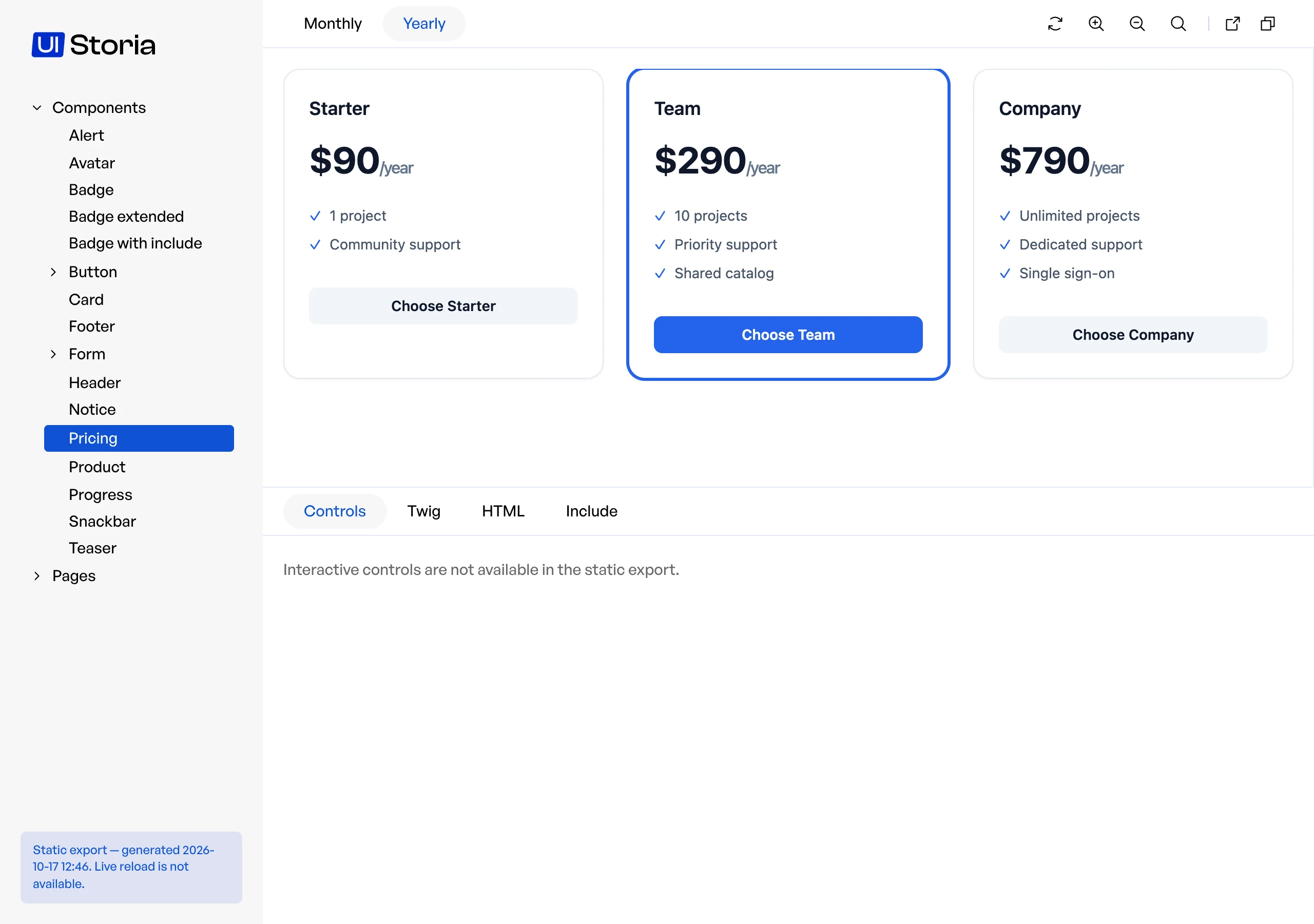
<img src="/media/export-result.cc9eb63a1c44668bbf55e89dd54fd0d4.webp" alt="The static export opened from a folder, with its note about live reload and controls" loading="lazy" decoding="async" width="2560" height="1800">
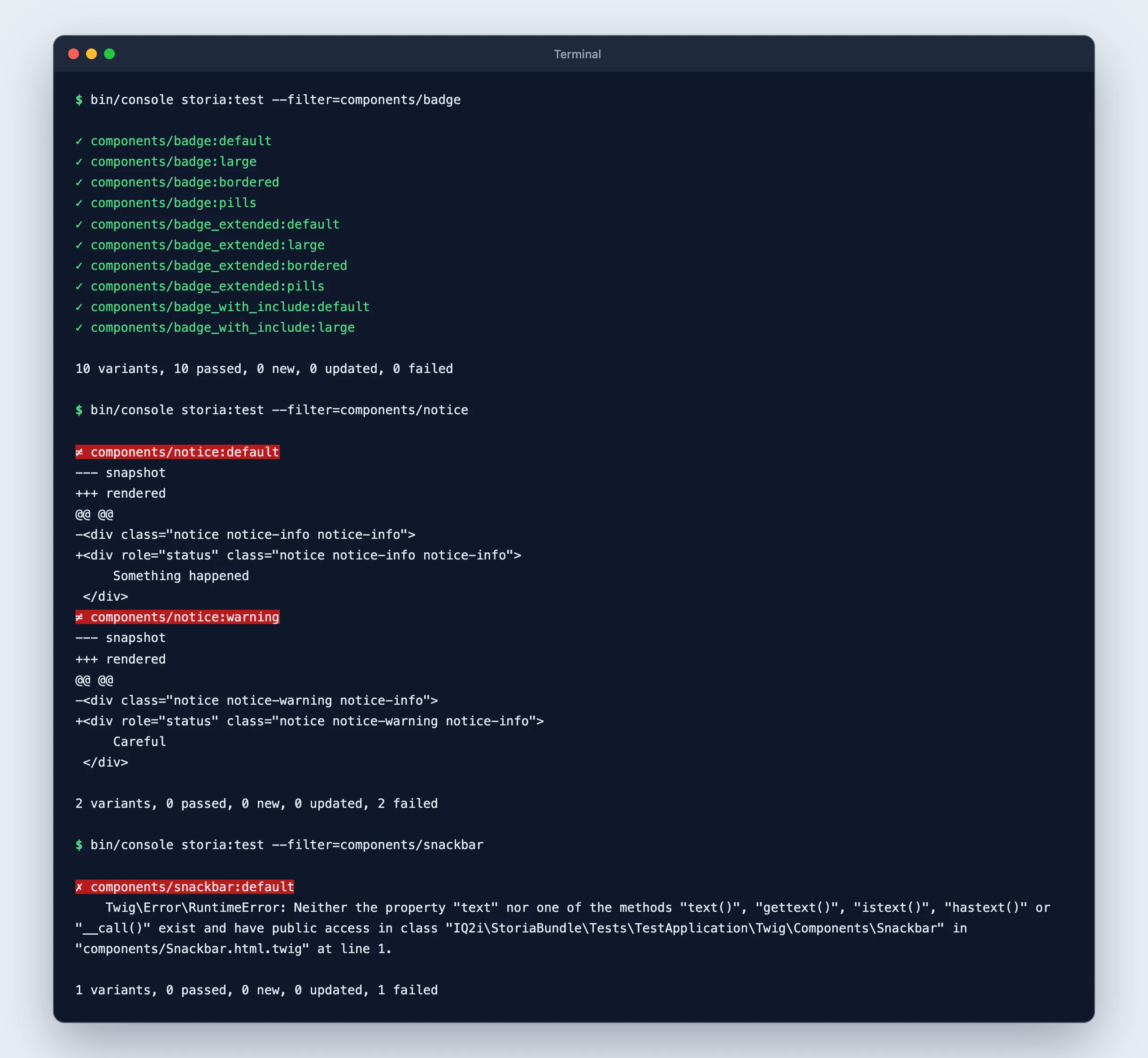
<p>The export stops at the first view, variant or asset that cannot be exported and tells which one:</p>
<pre><code translate="no">Variant "components/badge:default" failed: Unable to find template "ui/badge.html.twig"</code></pre>
<h2 id="output-directory">Output directory</h2>
<p>The default directory is <code translate="no">var/storia/export</code>. It is emptied at each export, but only if it was created by a previous export (it contains a <code translate="no">.storia-export</code> file). Any other non-empty directory is refused.</p>
<pre><code translate="no">index.html
components/badge/default.html           # page with menu, tabs and code
iframe/components/badge/default.html    # the rendered variant
bundles/iq2istoria/                     # UI Storia styles and scripts
css/, img/, ...                         # your assets</code></pre>
<h2 id="assets">Assets</h2>
<p>The export copies the assets your pages reference (stylesheets, scripts, images, fonts, import maps), and the assets referenced by those stylesheets.
A referenced file is taken from <code translate="no">public/</code> when it exists there; otherwise it is requested from your application, so assets served dynamically (AssetMapper in dev for instance) are exported too.
Root-relative URLs (<code translate="no">/assets/app.css</code>) are rewritten as relative ones, so the export works from a sub-path or from <code translate="no">file://</code>.</p>
<p>Assets that are only referenced by JavaScript can be listed in the configuration. Patterns are relative to the public directory and support <code translate="no">*</code> and <code translate="no">**</code>:</p>
<pre><code class="language-yaml hljs yaml" translate="no"><span class="hljs-comment"># config/packages/iq2i_storia.yaml</span>

<span class="hljs-attr">iq2i_storia:</span>
    <span class="hljs-attr">export:</span>
        <span class="hljs-attr">output_dir:</span> <span class="hljs-string">'%kernel.project_dir%/var/storia/export'</span>
        <span class="hljs-attr">public_dir:</span> <span class="hljs-string">'%kernel.project_dir%/public'</span>
        <span class="hljs-attr">assets:</span>
            <span class="hljs-bullet">-</span> <span class="hljs-string">'images/**'</span></code></pre>
<h2 id="deployment">Deployment</h2>
<p>The export only uses relative links, so it can be served from a sub-path such as <code translate="no">https://user.github.io/my-repo/</code>.</p>
<p>The command boots your application: run it in the environment where the bundle is registered (usually <code translate="no">dev</code>), with the development dependencies installed. If your assets are built by a tool such as Webpack Encore or Vite, build them before the export.</p>
<h3 id="github-pages">GitHub Pages</h3>
<p>Set <strong>Settings &gt; Pages &gt; Source</strong> to <strong>GitHub Actions</strong>, then add this workflow:</p>
<pre><code class="language-yaml hljs yaml" translate="no"><span class="hljs-comment"># .github/workflows/storia.yaml</span>

<span class="hljs-attr">name:</span> <span class="hljs-string">Storia</span>

<span class="hljs-attr">on:</span>
    <span class="hljs-attr">push:</span>
        <span class="hljs-attr">branches:</span> <span class="hljs-string">[main]</span>

<span class="hljs-attr">permissions:</span>
    <span class="hljs-attr">contents:</span> <span class="hljs-string">read</span>
    <span class="hljs-attr">pages:</span> <span class="hljs-string">write</span>
    <span class="hljs-attr">id-token:</span> <span class="hljs-string">write</span>

<span class="hljs-attr">concurrency:</span>
    <span class="hljs-attr">group:</span> <span class="hljs-string">pages</span>
    <span class="hljs-attr">cancel-in-progress:</span> <span class="hljs-literal">true</span>

<span class="hljs-attr">jobs:</span>
    <span class="hljs-attr">deploy:</span>
        <span class="hljs-attr">runs-on:</span> <span class="hljs-string">ubuntu-latest</span>
        <span class="hljs-attr">environment:</span>
            <span class="hljs-attr">name:</span> <span class="hljs-string">github-pages</span>
            <span class="hljs-attr">url:</span> <span class="hljs-string">${{</span> <span class="hljs-string">steps.deployment.outputs.page_url</span> <span class="hljs-string">}}</span>
        <span class="hljs-attr">steps:</span>
            <span class="hljs-bullet">-</span> <span class="hljs-attr">uses:</span> <span class="hljs-string">actions/checkout@v4</span>

            <span class="hljs-bullet">-</span> <span class="hljs-attr">uses:</span> <span class="hljs-string">shivammathur/setup-php@v2</span>
              <span class="hljs-attr">with:</span>
                  <span class="hljs-attr">php-version:</span> <span class="hljs-string">'8.3'</span>

            <span class="hljs-bullet">-</span> <span class="hljs-attr">run:</span> <span class="hljs-string">composer</span> <span class="hljs-string">install</span> <span class="hljs-string">--no-interaction</span> <span class="hljs-string">--prefer-dist</span>

            <span class="hljs-bullet">-</span> <span class="hljs-attr">run:</span> <span class="hljs-string">php</span> <span class="hljs-string">bin/console</span> <span class="hljs-string">storia:export</span> <span class="hljs-string">var/storia/export</span>
              <span class="hljs-attr">env:</span>
                  <span class="hljs-attr">APP_ENV:</span> <span class="hljs-string">dev</span>

            <span class="hljs-bullet">-</span> <span class="hljs-attr">uses:</span> <span class="hljs-string">actions/upload-pages-artifact@v3</span>
              <span class="hljs-attr">with:</span>
                  <span class="hljs-attr">path:</span> <span class="hljs-string">var/storia/export</span>

            <span class="hljs-bullet">-</span> <span class="hljs-attr">id:</span> <span class="hljs-string">deployment</span>
              <span class="hljs-attr">uses:</span> <span class="hljs-string">actions/deploy-pages@v4</span></code></pre>
<h3 id="gitlab-pages">GitLab Pages</h3>
<pre><code class="language-yaml hljs yaml" translate="no"><span class="hljs-comment"># .gitlab-ci.yml</span>

<span class="hljs-attr">pages:</span>
    <span class="hljs-attr">stage:</span> <span class="hljs-string">deploy</span>
    <span class="hljs-attr">image:</span> <span class="hljs-string">php:8.3-cli</span>
    <span class="hljs-attr">variables:</span>
        <span class="hljs-attr">APP_ENV:</span> <span class="hljs-string">dev</span>
    <span class="hljs-attr">before_script:</span>
        <span class="hljs-bullet">-</span> <span class="hljs-string">apt-get</span> <span class="hljs-string">update</span> <span class="hljs-string">&amp;&amp;</span> <span class="hljs-string">apt-get</span> <span class="hljs-string">install</span> <span class="hljs-string">-y</span> <span class="hljs-string">git</span> <span class="hljs-string">unzip</span>
        <span class="hljs-bullet">-</span> <span class="hljs-string">curl</span> <span class="hljs-string">-sS</span> <span class="hljs-string">https://getcomposer.org/installer</span> <span class="hljs-string">|</span> <span class="hljs-string">php</span> <span class="hljs-string">--</span> <span class="hljs-string">--install-dir=/usr/local/bin</span> <span class="hljs-string">--filename=composer</span>
    <span class="hljs-attr">script:</span>
        <span class="hljs-bullet">-</span> <span class="hljs-string">composer</span> <span class="hljs-string">install</span> <span class="hljs-string">--no-interaction</span> <span class="hljs-string">--prefer-dist</span>
        <span class="hljs-bullet">-</span> <span class="hljs-string">php</span> <span class="hljs-string">bin/console</span> <span class="hljs-string">storia:export</span> <span class="hljs-string">var/storia/export</span>
    <span class="hljs-attr">pages:</span>
        <span class="hljs-attr">publish:</span> <span class="hljs-string">var/storia/export</span>
    <span class="hljs-attr">rules:</span>
        <span class="hljs-bullet">-</span> <span class="hljs-attr">if:</span> <span class="hljs-string">$CI_COMMIT_BRANCH</span> <span class="hljs-string">==</span> <span class="hljs-string">$CI_DEFAULT_BRANCH</span></code></pre>
<p>The export is not written to <code translate="no">public/</code>, which is the default publish directory of GitLab Pages but also your application's public directory.</p>
<h2 id="limitations">Limitations</h2>
<ul>
<li>URLs built in JavaScript, and absolute URLs to a development server (<code translate="no">http://localhost:5173</code>), are not rewritten.</li>
<li>Assets served from an absolute base URL (a CDN, <code translate="no">asset()</code> configured with <code translate="no">base_urls</code>) are neither rewritten nor copied: the exported pages keep pointing to that host.</li>
<li>Browsers block ES modules on <code translate="no">file://</code> pages: a project that loads its own modules must serve the folder over HTTP, or be opened with Firefox.</li>
<li>The static export has no live reload.</li>
<li>The static export has no <a href="/docs/controls/">controls</a>.</li>
</ul>]]>
    </content>
  </entry>
  <entry xml:lang="en">
    <id>https://ui-storia.com/docs/getting-started/</id>
    <title>Getting started</title>
    <published>2026-10-17T13:32:35+00:00</published>
    <link href="https://ui-storia.com/docs/getting-started/" rel="alternate" type="text/html" />
    <content type="html">
      <![CDATA[<p>In ten minutes you will have a component, three variants and a test, without writing any PHP. You need a Symfony application (6.4 or later) with <a href="https://symfony.com/bundles/ux-twig-component/current/index.html" rel="noopener noreferrer">Symfony UX Twig Component</a>.</p>
<h2 id="1-install-the-bundle">1. Install the bundle</h2>
<p>Follow the <a href="/docs/installation/">installation</a> steps: require the package, register the routes and create the <code translate="no">storia</code> folder. The bundle is enabled in <code translate="no">dev</code> and <code translate="no">test</code>.</p>
<h2 id="2-create-an-anonymous-component">2. Create an anonymous component</h2>
<p>An anonymous component is a Twig template in <code translate="no">templates/components</code>, without any PHP class:</p>
<pre><code class="language-twig hljs twig" translate="no"><span class="hljs-comment">{# templates/components/Alert.html.twig #}</span><span class="xml">
</span><span class="hljs-template-tag">{% <span class="hljs-name">props</span> type = 'info' %}</span><span class="xml">

<span class="hljs-tag">&lt;<span class="hljs-name">div</span> <span class="hljs-attr">class</span>=<span class="hljs-string">"alert alert-</span></span></span><span class="hljs-template-variable">{{ type }}</span><span class="xml"><span class="hljs-tag"><span class="hljs-string">"</span> <span class="hljs-attr">role</span>=<span class="hljs-string">"alert"</span>&gt;</span>
    </span><span class="hljs-template-tag">{% <span class="hljs-name"><span class="hljs-keyword">block</span></span> content %}</span><span class="hljs-template-tag">{% <span class="hljs-name"><span class="hljs-keyword">endblock</span></span> %}</span><span class="xml">
<span class="hljs-tag">&lt;/<span class="hljs-name">div</span>&gt;</span></span></code></pre>
<p>It is the template your integrators write from a mockup, and the one your pages will use: <code translate="no">&lt;twig:Alert type="danger"&gt;Something went wrong&lt;/twig:Alert&gt;</code>.</p>
<h2 id="3-describe-it-with-variants">3. Describe it with variants</h2>
<p>Create the YAML file that lists the states of the component:</p>
<pre><code class="language-yaml hljs yaml" translate="no"><span class="hljs-comment"># storia/components/alert.yaml</span>

<span class="hljs-attr">component:</span> <span class="hljs-string">Alert</span>

<span class="hljs-attr">variants:</span>
    <span class="hljs-attr">info:</span>
        <span class="hljs-attr">blocks:</span>
            <span class="hljs-attr">content:</span> <span class="hljs-string">Your</span> <span class="hljs-string">profile</span> <span class="hljs-string">has</span> <span class="hljs-string">been</span> <span class="hljs-string">saved</span>

    <span class="hljs-attr">warning:</span>
        <span class="hljs-attr">args:</span>
            <span class="hljs-attr">type:</span> <span class="hljs-string">warning</span>
        <span class="hljs-attr">blocks:</span>
            <span class="hljs-attr">content:</span> <span class="hljs-string">Your</span> <span class="hljs-string">subscription</span> <span class="hljs-string">ends</span> <span class="hljs-string">tomorrow</span>

    <span class="hljs-attr">danger:</span>
        <span class="hljs-attr">args:</span>
            <span class="hljs-attr">type:</span> <span class="hljs-string">danger</span>
        <span class="hljs-attr">blocks:</span>
            <span class="hljs-attr">content:</span> <span class="hljs-string">Something</span> <span class="hljs-string">went</span> <span class="hljs-string">wrong</span></code></pre>
<h2 id="4-see-the-result">4. See the result</h2>
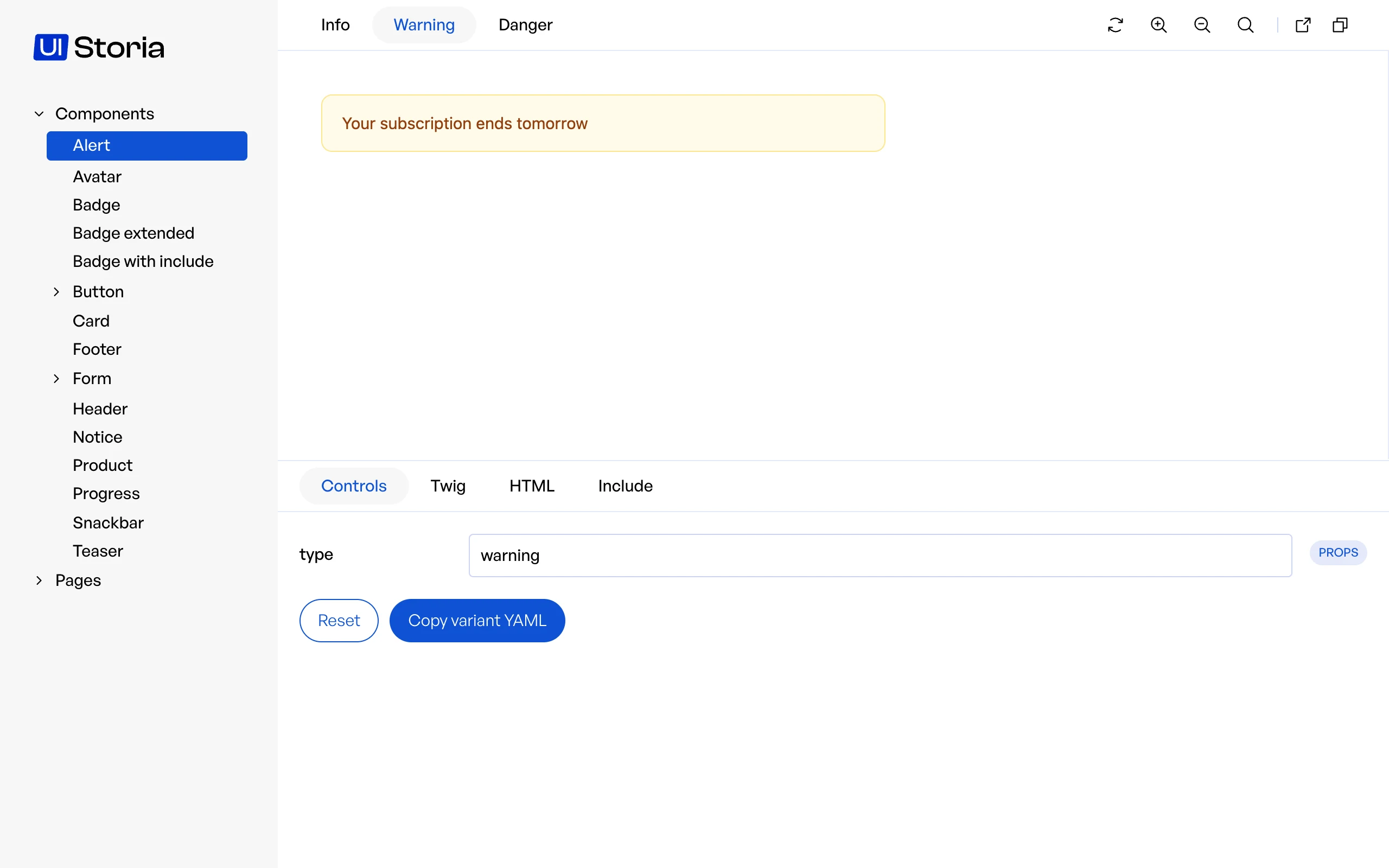
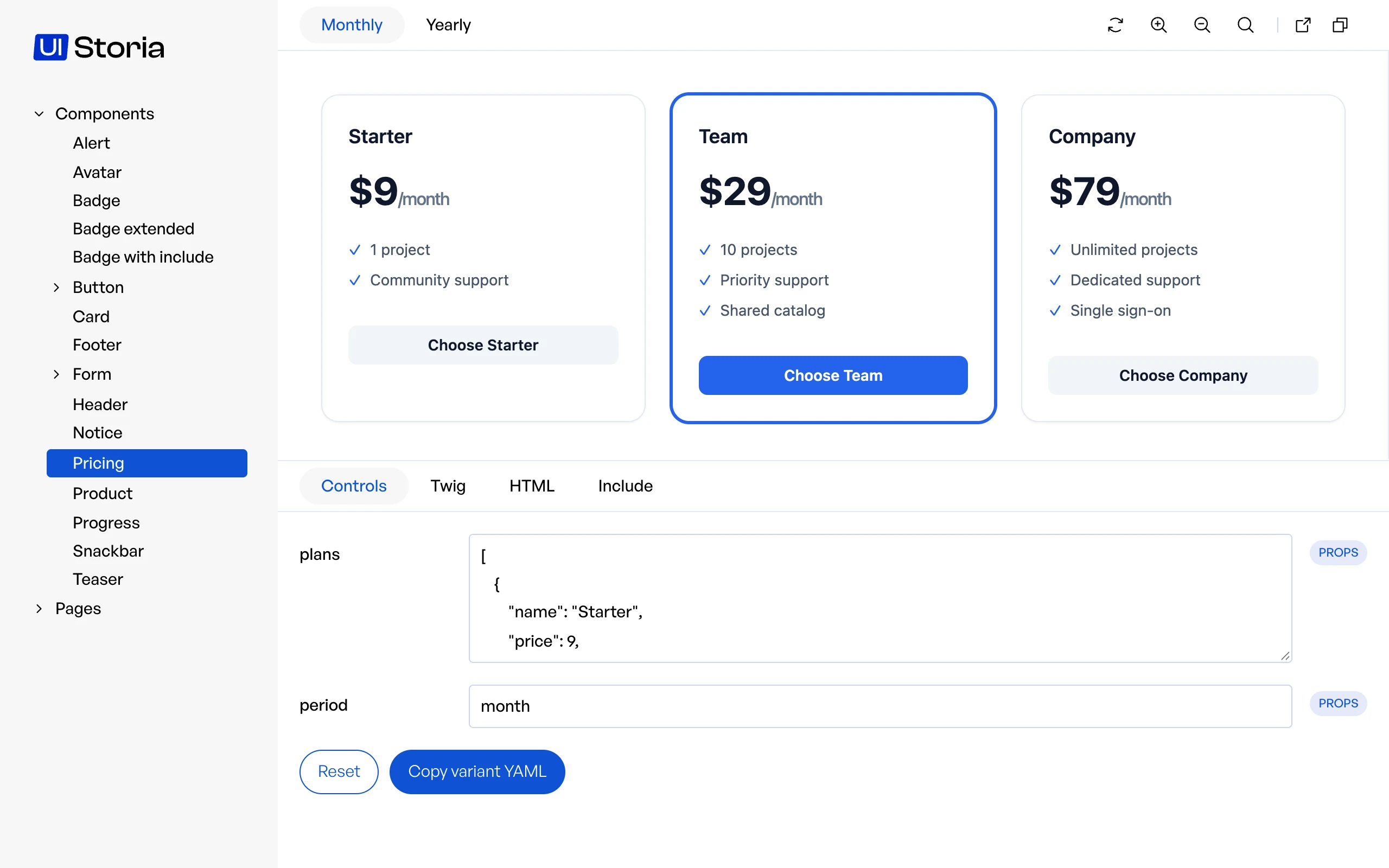
<p>Open <code translate="no">/storia/components/alert</code>. You see the three variants as tabs, the rendered component, its Twig code and its HTML. The <strong>Controls</strong> tab already lets you change <code translate="no">type</code> and watch the result, as it comes from the <code translate="no">{% props %}</code> of the template.</p>
<img src="/media/getting-started-alert.41b3dc0008be28b2cf1ab7534106b9d3.webp" alt="The Alert component in UI Storia, with its three variants as tabs and its Controls tab" loading="lazy" decoding="async" width="2560" height="1600">
<p>Run <code translate="no">bin/console storia:watch</code> to reload the preview when you save a file.</p>
<h2 id="5-use-real-looking-data">5. Use real-looking data</h2>
<p>Replace the hard-coded messages with generated text, so the component is also checked with long content:</p>
<pre><code class="language-yaml hljs yaml" translate="no">        <span class="hljs-attr">blocks:</span>
            <span class="hljs-attr">content:</span> <span class="hljs-type">!lorem</span> <span class="hljs-number">30</span></code></pre>
<p>See <a href="/docs/data/">Data</a> to share data between views.</p>
<h2 id="6-protect-it-with-a-test">6. Protect it with a test</h2>
<pre><code class="language-bash hljs bash" translate="no">bin/console storia:<span class="hljs-built_in">test</span></code></pre>
<p>Every variant is rendered, and its HTML is saved as a snapshot the first time. Commit the snapshots: from now on, the command fails when a variant cannot be rendered or when its HTML changes by accident. See <a href="/docs/testing/">Testing</a>.</p>
<h2 id="what-s-next">What's next</h2>
<ul>
<li>Read the <a href="/docs/workflow/">workflow</a> to see how integrators and developers work on the same files.</li>
<li>Learn everything the YAML files accept in <a href="/docs/interfaces/">Interfaces</a>.</li>
<li>Publish the catalog with the <a href="/docs/export/">static export</a>.</li>
</ul>]]>
    </content>
  </entry>
  <entry xml:lang="en">
    <id>https://ui-storia.com/docs/installation/</id>
    <title>Installation</title>
    <published>2026-10-17T13:32:35+00:00</published>
    <link href="https://ui-storia.com/docs/installation/" rel="alternate" type="text/html" />
    <content type="html">
      <![CDATA[<h2 id="require-the-package">Require the package</h2>
<p>Add <a href="https://packagist.org/packages/iq2i/storia-bundle" rel="noopener noreferrer">iq2i/storia-bundle</a> to your composer.json file:</p>
<pre><code class="language-bash hljs bash" translate="no">composer require iq2i/storia-bundle</code></pre>
<h2 id="register-and-configure-the-bundle">Register and configure the bundle</h2>
<p>If you are using Symfony Flex, the following steps should be done automatically. Otherwise, follow the instructions.</p>
<h3 id="register-the-bundle">Register the bundle</h3>
<p>Inside config/bundles.php, add the following line:</p>
<pre><code class="language-php hljs php" translate="no"><span class="hljs-comment">// config/bundles.php</span>

<span class="hljs-keyword">return</span> [
    <span class="hljs-comment">// ...</span>
    IQ2i\StoriaBundle\IQ2iStoriaBundle::class =&gt; [<span class="hljs-string">'all'</span> =&gt; <span class="hljs-keyword">true</span>],
];</code></pre>
<h3 id="add-routes">Add routes</h3>
<p>Create a new routing file to add UI Storia's routes:</p>
<pre><code class="language-yaml hljs yaml" translate="no"><span class="hljs-comment"># config/routes/iq2i_storia.yaml</span>
<span class="hljs-attr">iq2i_storia:</span>
    <span class="hljs-attr">resource:</span> <span class="hljs-string">'@IQ2iStoriaBundle/config/routes.php'</span>
    <span class="hljs-attr">prefix:</span> <span class="hljs-string">'/storia'</span></code></pre>
<h3 id="create-folders-where-yaml-files-are-stored">Create folders where YAML files are stored</h3>
<p>Create the <code translate="no">storia</code> folder at the root of your project, with two subfolders: <code translate="no">components</code> and <code translate="no">pages</code>.</p>
<h2 id="configure-the-bundle">Configure the bundle</h2>
<p>By default, UI Storia will try to read YAML files in the <code translate="no">storia</code> folder at the root of your application.
You can change this behavior by creating a configuration file <code translate="no">config/packages/iq2i_storia.yaml</code> with the following content:</p>
<pre><code class="language-yaml hljs yaml" translate="no"><span class="hljs-comment"># config/packages/iq2i_storia.yaml</span>

<span class="hljs-attr">iq2i_storia:</span>
    <span class="hljs-attr">default_path:</span> <span class="hljs-string">'%kernel.project_dir%/new-folder'</span></code></pre>
<h3 id="when-is-the-bundle-enabled">When is the bundle enabled?</h3>
<p>UI Storia is enabled when <code translate="no">kernel.debug</code> is true, like the Symfony profiler: in <code translate="no">dev</code> and <code translate="no">test</code>, not in <code translate="no">prod</code>. Its routes answer with a 404 when it is disabled. The commands (<code translate="no">storia:test</code>, <code translate="no">storia:export</code>, ...) keep working in every environment.</p>
<p>The content of the <code translate="no">storia/</code> folder is executed by the bundle, see <a href="/docs/data/#security">Security</a>.</p>
<p>Force the value with the <code translate="no">enabled</code> option when you need to:</p>
<pre><code class="language-yaml hljs yaml" translate="no"><span class="hljs-comment"># config/packages/iq2i_storia.yaml</span>

<span class="hljs-attr">iq2i_storia:</span>
    <span class="hljs-comment"># expose UI Storia on a staging environment that runs with debug disabled</span>
    <span class="hljs-attr">enabled:</span> <span class="hljs-literal">true</span></code></pre>
<pre><code class="language-yaml hljs yaml" translate="no"><span class="hljs-comment"># config/packages/iq2i_storia.yaml</span>

<span class="hljs-attr">iq2i_storia:</span>
    <span class="hljs-comment"># or turn it off everywhere, with an environment variable for easier configuration</span>
    <span class="hljs-attr">enabled:</span> <span class="hljs-string">'%env(bool:IQ2I_STORIA_ENABLED)%'</span></code></pre>
<h2 id="load-your-styles-and-scripts">Load your styles and scripts</h2>
<p>UI Storia will render your interfaces without CSS or JavaScript.<br>
To instruct UI Storia to use your styles and scripts, simply override the <code translate="no">iframe.html.twig</code> template following the <a href="https://symfony.com/doc/current/bundles/override.html#templates" rel="noopener noreferrer">Symfony documentation</a>:</p>
<pre><code class="language-twig hljs twig" translate="no"><span class="hljs-comment">{# templates/bundles/IQ2iStoriaBundle/iframe.html.twig #}</span><span class="xml">

</span><span class="hljs-template-tag">{% <span class="hljs-name"><span class="hljs-keyword">extends</span></span> '@!IQ2iStoria/iframe.html.twig' %}</span><span class="xml">

</span><span class="hljs-comment">{# if you use WebpackEncoreBundle #}</span><span class="xml">
</span><span class="hljs-template-tag">{% <span class="hljs-name"><span class="hljs-keyword">block</span></span> stylesheets %}</span><span class="xml">
    </span><span class="hljs-template-variable">{{ encore_entry_link_tags('app') }}</span><span class="xml">
</span><span class="hljs-template-tag">{% <span class="hljs-name"><span class="hljs-keyword">endblock</span></span> %}</span><span class="xml">
</span><span class="hljs-template-tag">{% <span class="hljs-name"><span class="hljs-keyword">block</span></span> javascripts %}</span><span class="xml">
   </span><span class="hljs-template-variable">{{ encore_entry_script_tags('app') }}</span><span class="xml">
</span><span class="hljs-template-tag">{% <span class="hljs-name"><span class="hljs-keyword">endblock</span></span> %}</span><span class="xml">

</span><span class="hljs-comment">{# if you use AssetMapper #}</span><span class="xml">
</span><span class="hljs-template-tag">{% <span class="hljs-name"><span class="hljs-keyword">block</span></span> javascripts %}</span><span class="xml">
   </span><span class="hljs-template-tag">{% <span class="hljs-name"><span class="hljs-keyword">block</span></span> importmap %}</span><span class="hljs-template-variable">{{ importmap('app') }}</span><span class="hljs-template-tag">{% <span class="hljs-name"><span class="hljs-keyword">endblock</span></span> %}</span><span class="xml">
</span><span class="hljs-template-tag">{% <span class="hljs-name"><span class="hljs-keyword">endblock</span></span> %}</span></code></pre>
<aside class="note note-tip markdown-alert markdown-alert-tip"><p class="markdown-alert-title">
    <svg class="octicon octicon-light-bulb mr-2" viewbox="0 0 16 16" version="1.1" width="16" height="16" aria-hidden="true"><path d="M8 1.5c-2.363 0-4 1.69-4 3.75 0 .984.424 1.625.984 2.304l.214.253c.223.264.47.556.673.848.284.411.537.896.621 1.49a.75.75 0 0 1-1.484.211c-.04-.282-.163-.547-.37-.847a8.456 8.456 0 0 0-.542-.68c-.084-.1-.173-.205-.268-.32C3.201 7.75 2.5 6.766 2.5 5.25 2.5 2.31 4.863 0 8 0s5.5 2.31 5.5 5.25c0 1.516-.701 2.5-1.328 3.259-.095.115-.184.22-.268.319-.207.245-.383.453-.541.681-.208.3-.33.565-.37.847a.751.751 0 0 1-1.485-.212c.084-.593.337-1.078.621-1.489.203-.292.45-.584.673-.848.075-.088.147-.173.213-.253.561-.679.985-1.32.985-2.304 0-2.06-1.637-3.75-4-3.75ZM5.75 12h4.5a.75.75 0 0 1 0 1.5h-4.5a.75.75 0 0 1 0-1.5ZM6 15.25a.75.75 0 0 1 .75-.75h2.5a.75.75 0 0 1 0 1.5h-2.5a.75.75 0 0 1-.75-.75Z"></path></svg>
    Tip
</p>
<p>Note the use of <code translate="no">!</code> in the extended template name to override only the blocks you need rather than the entire template.</p></aside>]]>
    </content>
  </entry>
  <entry xml:lang="en">
    <id>https://ui-storia.com/docs/interfaces/</id>
    <title>Interfaces</title>
    <published>2026-10-17T13:32:35+00:00</published>
    <link href="https://ui-storia.com/docs/interfaces/" rel="alternate" type="text/html" />
    <content type="html">
      <![CDATA[<p>UI Storia allows you to create interfaces for individual components or more complete pages.<br>
You can work with Twig templates from your Symfony application or with local templates that will be used only for UI Storia.</p>
<p>To describe your interfaces, simply create a YAML file in the <code translate="no">storia/components</code> or <code translate="no">storia/pages</code> folder as follows:</p>
<pre><code class="language-yaml hljs yaml" translate="no"><span class="hljs-comment"># storia/components/progress.yaml</span>

<span class="hljs-attr">template:</span> <span class="hljs-string">ui/progress.html.twig</span>
<span class="hljs-attr">variants:</span>
    <span class="hljs-attr">small:</span>
        <span class="hljs-attr">args:</span>
            <span class="hljs-attr">height:</span> <span class="hljs-number">1.5</span>

    <span class="hljs-attr">default:</span>
        <span class="hljs-attr">args:</span>
            <span class="hljs-attr">height:</span> <span class="hljs-number">2.5</span>

    <span class="hljs-attr">large:</span>
        <span class="hljs-attr">args:</span>
            <span class="hljs-attr">height:</span> <span class="hljs-number">4</span>

    <span class="hljs-attr">extra_large:</span>
        <span class="hljs-attr">args:</span>
            <span class="hljs-attr">height:</span> <span class="hljs-number">6</span></code></pre>
<p>The difference between the <code translate="no">storia/components</code> folder and the <code translate="no">storia/pages</code> folder is as follows:<br>
By convention, use the <code translate="no">storia/components</code> folder for interfaces related to macro components and the <code translate="no">storia/pages</code> folder for interfaces for more complete pages.</p>
<p>Here's the configuration details:</p>
<ul>
<li><code translate="no">template</code>: Corresponds to the path to the Twig template of your Symfony application that you want to work with.</li>
<li><code translate="no">variants</code>: This is the list of different variants you want to create.</li>
</ul>
<h2 id="template-component">Template / Component</h2>
<p>The <code translate="no">template</code> key is optional because you can also use a Twig template at the same level and with the same name as your YAML file.
For example, for your YAML file <code translate="no">storia/components/progress.yaml</code>, you can create a file <code translate="no">storia/components/progress.html.twig</code> and this file will be used by UI Storia.</p>
<p>UI Storia also provides native support for <a href="https://symfony.com/bundles/ux-twig-component/current/index.html" rel="noopener noreferrer">Twig Component</a> for your interfaces. To do this, simply replace the <code translate="no">template</code> key with the <code translate="no">component</code> key as shown below:</p>
<pre><code class="language-yaml hljs yaml" translate="no"><span class="hljs-comment"># storia/components/button.yaml</span>

<span class="hljs-attr">component:</span> <span class="hljs-string">Button</span>
<span class="hljs-attr">variants:</span>
    <span class="hljs-attr">plain:</span>
        <span class="hljs-attr">args:</span>
            <span class="hljs-attr">class:</span> <span class="hljs-string">plain</span>
            <span class="hljs-attr">label:</span> <span class="hljs-string">Plain</span> <span class="hljs-string">button</span>

    <span class="hljs-attr">outline:</span>
        <span class="hljs-attr">args:</span>
            <span class="hljs-attr">class:</span> <span class="hljs-string">outline</span>
            <span class="hljs-attr">label:</span> <span class="hljs-string">Outline</span> <span class="hljs-string">button</span></code></pre>
<h2 id="form-types">Form Types</h2>
<p>UI Storia provides native support for <a href="https://symfony.com/doc/current/forms.html" rel="noopener noreferrer">Symfony Form Types</a>, allowing you to preview and test form fields in isolation.</p>
<p>To work with a Form Type, use the <code translate="no">form</code> key instead of <code translate="no">template</code> or <code translate="no">component</code>:</p>
<pre><code class="language-yaml hljs yaml" translate="no"><span class="hljs-comment"># storia/components/form/text.yaml</span>

<span class="hljs-attr">form:</span> <span class="hljs-string">Symfony\Component\Form\Extension\Core\Type\TextType</span></code></pre>
<pre><code class="language-yaml hljs yaml" translate="no"><span class="hljs-comment"># storia/components/form/choice.yaml</span>

<span class="hljs-attr">form:</span> <span class="hljs-string">Symfony\Component\Form\Extension\Core\Type\ChoiceType</span>
<span class="hljs-attr">options:</span>
    <span class="hljs-attr">choices:</span>
        <span class="hljs-attr">'In Stock':</span> <span class="hljs-literal">true</span>
        <span class="hljs-attr">'Out of Stock':</span> <span class="hljs-literal">false</span></code></pre>
<h3 id="automatic-variants">Automatic Variants</h3>
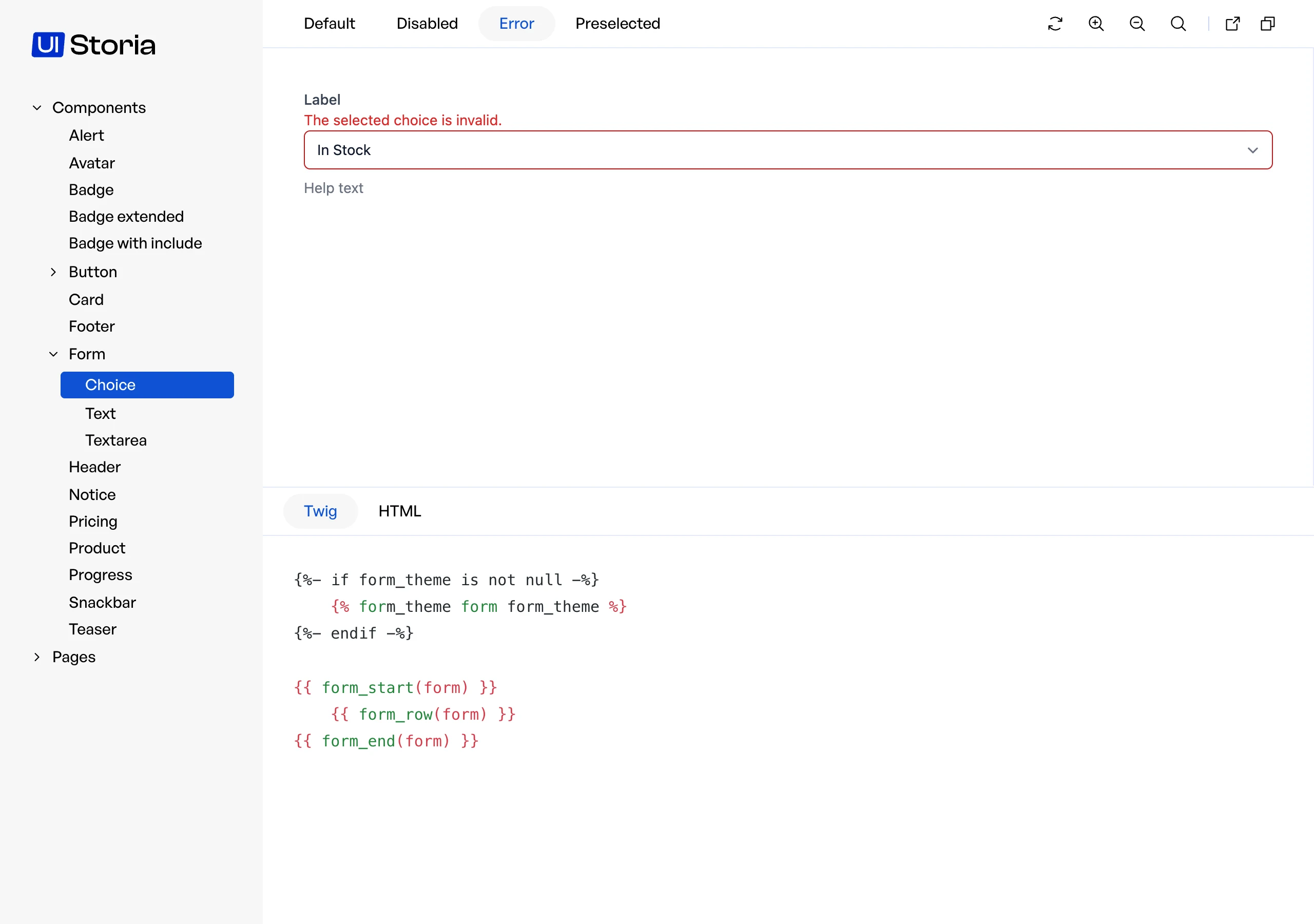
<p>When using the <code translate="no">form</code> key, UI Storia automatically generates <strong>three variants</strong> for you:</p>
<ol>
<li><strong>default</strong>: The form field in its normal state</li>
<li><strong>disabled</strong>: The form field with <code translate="no">disabled: true</code> option</li>
<li><strong>error</strong>: The form field with a validation error displayed</li>
</ol>
<img src="/media/form-variants.80be99a29862432cacdb7ab187c94d07.webp" alt="A choice field in its error variant" loading="lazy" decoding="async" width="2560" height="1800">
<h3 id="custom-variants">Custom Variants</h3>
<p>Declare your own variants with the <code translate="no">variants</code> key. They are added after the three automatic ones, and a variant with the same name as an automatic one replaces it.</p>
<p>A variant of a form accepts two keys instead of <code translate="no">args</code> and <code translate="no">blocks</code>:</p>
<ul>
<li><code translate="no">options</code>: Form options merged over the global <code translate="no">options</code> of the file. The variant wins.</li>
<li><code translate="no">with_errors</code>: Set it to <code translate="no">true</code> to display a validation error.</li>
</ul>
<pre><code class="language-yaml hljs yaml" translate="no"><span class="hljs-comment"># storia/components/form/choice.yaml</span>

<span class="hljs-attr">form:</span> <span class="hljs-string">Symfony\Component\Form\Extension\Core\Type\ChoiceType</span>
<span class="hljs-attr">options:</span>
    <span class="hljs-attr">choices:</span>
        <span class="hljs-attr">'In Stock':</span> <span class="hljs-literal">true</span>
        <span class="hljs-attr">'Out of Stock':</span> <span class="hljs-literal">false</span>
<span class="hljs-attr">variants:</span>
    <span class="hljs-attr">preselected:</span>
        <span class="hljs-attr">options:</span>
            <span class="hljs-attr">data:</span> <span class="hljs-literal">true</span>
    <span class="hljs-attr">unavailable:</span>
        <span class="hljs-attr">options:</span>
            <span class="hljs-attr">data:</span> <span class="hljs-literal">false</span>
            <span class="hljs-attr">disabled:</span> <span class="hljs-literal">true</span></code></pre>
<h3 id="options">Options</h3>
<p>The <code translate="no">options</code> key allows you to pass options to your Form Type constructor, just like you would when creating a form in Symfony:</p>
<pre><code class="language-yaml hljs yaml" translate="no"><span class="hljs-comment"># storia/components/form/email.yaml</span>

<span class="hljs-attr">form:</span> <span class="hljs-string">Symfony\Component\Form\Extension\Core\Type\EmailType</span>
<span class="hljs-attr">options:</span>
    <span class="hljs-attr">required:</span> <span class="hljs-literal">false</span>
    <span class="hljs-attr">attr:</span>
        <span class="hljs-attr">placeholder:</span> <span class="hljs-string">'Enter your email'</span></code></pre>
<h3 id="form-theme">Form Theme</h3>
<p>You can also specify a custom form theme for rendering your form field using the <code translate="no">form_theme</code> key:</p>
<pre><code class="language-yaml hljs yaml" translate="no"><span class="hljs-comment"># storia/components/form/custom.yaml</span>

<span class="hljs-attr">form:</span> <span class="hljs-string">App\Form\CustomType</span>
<span class="hljs-attr">form_theme:</span> <span class="hljs-string">'forms/custom_theme.html.twig'</span>
<span class="hljs-attr">options:</span>
    <span class="hljs-attr">label:</span> <span class="hljs-string">'Custom Field'</span></code></pre>
<aside class="note note-important markdown-alert markdown-alert-important"><p class="markdown-alert-title">
    <svg class="octicon octicon-report mr-2" viewbox="0 0 16 16" version="1.1" width="16" height="16" aria-hidden="true"><path d="M0 1.75C0 .784.784 0 1.75 0h12.5C15.216 0 16 .784 16 1.75v9.5A1.75 1.75 0 0 1 14.25 13H8.06l-2.573 2.573A1.458 1.458 0 0 1 3 14.543V13H1.75A1.75 1.75 0 0 1 0 11.25Zm1.75-.25a.25.25 0 0 0-.25.25v9.5c0 .138.112.25.25.25h2a.75.75 0 0 1 .75.75v2.19l2.72-2.72a.749.749 0 0 1 .53-.22h6.5a.25.25 0 0 0 .25-.25v-9.5a.25.25 0 0 0-.25-.25Zm7 2.25v2.5a.75.75 0 0 1-1.5 0v-2.5a.75.75 0 0 1 1.5 0ZM9 9a1 1 0 1 1-2 0 1 1 0 0 1 2 0Z"></path></svg>
    Important
</p>
<p>The <code translate="no">form</code> key cannot be used together with <code translate="no">template</code> or <code translate="no">component</code>. Choose one approach per YAML file.</p>
<p>The <code translate="no">options</code> and <code translate="no">form_theme</code> keys are only allowed when using the <code translate="no">form</code> key - they cannot be used with templates or components.</p>
<p>The <code translate="no">options</code> and <code translate="no">with_errors</code> keys of a variant are allowed for forms only, as <code translate="no">args</code> and <code translate="no">blocks</code> are allowed for templates and components only.</p></aside>
<h2 id="variants">Variants</h2>
<p>The <code translate="no">variants</code> key lists the different variations of your interface, passing different arguments to your template.</p>
<p>Each variant is described with a name (which can be overridden as shown in the example below) and an array of arguments called <code translate="no">args</code>.
Twig Component support also brings a <code translate="no">blocks</code> key to configure <a href="https://symfony.com/bundles/ux-twig-component/current/index.html#passing-html-to-components-via-blocks" rel="noopener noreferrer">HTML blocks</a> that will be passed to your component. A block is plain HTML: it is printed as is and never compiled as Twig.</p>
<pre><code class="language-yaml hljs yaml" translate="no"><span class="hljs-comment"># storia/components/button.yaml</span>

<span class="hljs-attr">component:</span> <span class="hljs-string">Button</span>
<span class="hljs-attr">variants:</span>
    <span class="hljs-attr">plain:</span>
        <span class="hljs-attr">args:</span>
            <span class="hljs-attr">class:</span> <span class="hljs-string">plain</span>
        <span class="hljs-attr">blocks:</span>
            <span class="hljs-attr">content:</span> <span class="hljs-string">Plain</span> <span class="hljs-string">button</span>
            <span class="hljs-attr">svg:</span> <span class="hljs-string">'&lt;svg xmlns="http://www.w3.org/2000/svg" xml:space="preserve" width="200" height="200" viewBox="0 0 42 42"&gt;&lt;path d="M42 20H22V0h-2v20H0v2h20v20h2V22h20z"/&gt;&lt;/svg&gt;'</span>

    <span class="hljs-attr">outline:</span>
        <span class="hljs-attr">name:</span> <span class="hljs-string">My</span> <span class="hljs-string">outline</span> <span class="hljs-string">button</span> 
        <span class="hljs-attr">args:</span>
            <span class="hljs-attr">class:</span> <span class="hljs-string">outline</span>
        <span class="hljs-attr">blocks:</span>
            <span class="hljs-attr">content:</span> <span class="hljs-string">Outline</span> <span class="hljs-string">button</span>
            <span class="hljs-attr">svg:</span> <span class="hljs-string">'&lt;svg xmlns="http://www.w3.org/2000/svg" xml:space="preserve" width="200" height="200" viewBox="0 0 42 42"&gt;&lt;path d="M42 20H22V0h-2v20H0v2h20v20h2V22h20z"/&gt;&lt;/svg&gt;'</span></code></pre>
<aside class="note note-important markdown-alert markdown-alert-important"><p class="markdown-alert-title">
    <svg class="octicon octicon-report mr-2" viewbox="0 0 16 16" version="1.1" width="16" height="16" aria-hidden="true"><path d="M0 1.75C0 .784.784 0 1.75 0h12.5C15.216 0 16 .784 16 1.75v9.5A1.75 1.75 0 0 1 14.25 13H8.06l-2.573 2.573A1.458 1.458 0 0 1 3 14.543V13H1.75A1.75 1.75 0 0 1 0 11.25Zm1.75-.25a.25.25 0 0 0-.25.25v9.5c0 .138.112.25.25.25h2a.75.75 0 0 1 .75.75v2.19l2.72-2.72a.749.749 0 0 1 .53-.22h6.5a.25.25 0 0 0 .25-.25v-9.5a.25.25 0 0 0-.25-.25Zm7 2.25v2.5a.75.75 0 0 1-1.5 0v-2.5a.75.75 0 0 1 1.5 0ZM9 9a1 1 0 1 1-2 0 1 1 0 0 1 2 0Z"></path></svg>
    Important
</p>
<p>Note here that the <code translate="no">content</code> block is the default block for Twig Component according to the documentation (<a href="https://symfony.com/bundles/ux-twig-component/current/index.html#passing-html-to-components" rel="noopener noreferrer">see here</a>), so it will have a different behavior that we will detail later.</p></aside>
<h2 id="advanced-include-and-extends">Advanced: include and extends</h2>
<p>To share data between views, prefer <a href="/docs/data/">named data</a>. <code translate="no">include:</code> and <code translate="no">extends:</code> are advanced features meant for sharing YAML structure.</p>
<p>UI Storia supports two directives to avoid duplication across your YAML files: <code translate="no">include:</code> for sharing anchor definitions, and <code translate="no">extends:</code> for inheriting and overriding a complete configuration.</p>
<h3 id="include-shared-anchor-definitions"><code translate="no">include:</code> — Shared anchor definitions</h3>
<p>The <code translate="no">include:</code> directive lets you define YAML anchors in a shared file and reuse them across multiple configuration files.</p>
<p>Create a shared file anywhere in your <code translate="no">storia/</code> folder (conventionally prefixed with <code translate="no">_</code> to indicate it is not a standalone view):</p>
<pre><code class="language-yaml hljs yaml" translate="no"><span class="hljs-comment"># storia/_shared.yaml</span>

<span class="hljs-attr">_definitions:</span>
    <span class="hljs-attr">default_badge:</span> <span class="hljs-meta">&amp;default_badge</span>
        <span class="hljs-attr">class:</span> <span class="hljs-string">bg-blue-100</span> <span class="hljs-string">text-blue-800</span> <span class="hljs-string">text-xs</span> <span class="hljs-string">font-medium</span> <span class="hljs-string">px-2.5</span> <span class="hljs-string">py-0.5</span> <span class="hljs-string">rounded</span>

    <span class="hljs-attr">large_badge:</span> <span class="hljs-meta">&amp;large_badge</span>
        <span class="hljs-attr">class:</span> <span class="hljs-string">bg-blue-100</span> <span class="hljs-string">text-blue-800</span> <span class="hljs-string">text-sm</span> <span class="hljs-string">font-medium</span> <span class="hljs-string">px-2.5</span> <span class="hljs-string">py-0.5</span> <span class="hljs-string">rounded</span></code></pre>
<p>Then include it from any configuration file using <code translate="no">include:</code> and reference the anchors with the standard YAML <code translate="no">*</code> syntax:</p>
<pre><code class="language-yaml hljs yaml" translate="no"><span class="hljs-comment"># storia/components/badge.yaml</span>

<span class="hljs-attr">include:</span> <span class="hljs-string">_shared</span>

<span class="hljs-attr">template:</span> <span class="hljs-string">ui/badge.html.twig</span>
<span class="hljs-attr">variants:</span>
    <span class="hljs-attr">default:</span>
        <span class="hljs-attr">args:</span>
            <span class="hljs-string">&lt;&lt;:</span> <span class="hljs-meta">*default_badge</span>

    <span class="hljs-attr">large:</span>
        <span class="hljs-attr">args:</span>
            <span class="hljs-string">&lt;&lt;:</span> <span class="hljs-meta">*large_badge</span></code></pre>
<p>You can include multiple files using a list:</p>
<pre><code class="language-yaml hljs yaml" translate="no"><span class="hljs-attr">include:</span> <span class="hljs-string">[_colors,</span> <span class="hljs-string">_sizes]</span>

<span class="hljs-comment"># or equivalently:</span>
<span class="hljs-attr">include:</span>
    <span class="hljs-bullet">-</span> <span class="hljs-string">_colors</span>
    <span class="hljs-bullet">-</span> <span class="hljs-string">_sizes</span></code></pre>
<aside class="note note-tip markdown-alert markdown-alert-tip"><p class="markdown-alert-title">
    <svg class="octicon octicon-light-bulb mr-2" viewbox="0 0 16 16" version="1.1" width="16" height="16" aria-hidden="true"><path d="M8 1.5c-2.363 0-4 1.69-4 3.75 0 .984.424 1.625.984 2.304l.214.253c.223.264.47.556.673.848.284.411.537.896.621 1.49a.75.75 0 0 1-1.484.211c-.04-.282-.163-.547-.37-.847a8.456 8.456 0 0 0-.542-.68c-.084-.1-.173-.205-.268-.32C3.201 7.75 2.5 6.766 2.5 5.25 2.5 2.31 4.863 0 8 0s5.5 2.31 5.5 5.25c0 1.516-.701 2.5-1.328 3.259-.095.115-.184.22-.268.319-.207.245-.383.453-.541.681-.208.3-.33.565-.37.847a.751.751 0 0 1-1.485-.212c.084-.593.337-1.078.621-1.489.203-.292.45-.584.673-.848.075-.088.147-.173.213-.253.561-.679.985-1.32.985-2.304 0-2.06-1.637-3.75-4-3.75ZM5.75 12h4.5a.75.75 0 0 1 0 1.5h-4.5a.75.75 0 0 1 0-1.5ZM6 15.25a.75.75 0 0 1 .75-.75h2.5a.75.75 0 0 1 0 1.5h-2.5a.75.75 0 0 1-.75-.75Z"></path></svg>
    Tip
</p>
<p>The <code translate="no">_definitions:</code> key is reserved for anchor definitions and is automatically stripped before the configuration is processed. It will never appear as a variant or option in the UI.</p></aside>
<h3 id="extends-configuration-inheritance"><code translate="no">extends:</code> — Configuration inheritance</h3>
<p>The <code translate="no">extends:</code> directive allows a configuration file to inherit all settings from a parent file and selectively override only the parts that differ.</p>
<pre><code class="language-yaml hljs yaml" translate="no"><span class="hljs-comment"># storia/components/badge.yaml</span>

<span class="hljs-attr">template:</span> <span class="hljs-string">ui/badge.html.twig</span>
<span class="hljs-attr">variants:</span>
    <span class="hljs-attr">default:</span>
        <span class="hljs-attr">args:</span>
            <span class="hljs-attr">class:</span> <span class="hljs-string">bg-blue-100</span> <span class="hljs-string">text-blue-800</span> <span class="hljs-string">text-xs</span> <span class="hljs-string">font-medium</span> <span class="hljs-string">px-2.5</span> <span class="hljs-string">py-0.5</span> <span class="hljs-string">rounded</span>
    <span class="hljs-attr">large:</span>
        <span class="hljs-attr">args:</span>
            <span class="hljs-attr">class:</span> <span class="hljs-string">bg-blue-100</span> <span class="hljs-string">text-blue-800</span> <span class="hljs-string">text-sm</span> <span class="hljs-string">font-medium</span> <span class="hljs-string">px-2.5</span> <span class="hljs-string">py-0.5</span> <span class="hljs-string">rounded</span>
    <span class="hljs-attr">bordered:</span>
        <span class="hljs-attr">args:</span>
            <span class="hljs-attr">class:</span> <span class="hljs-string">bg-blue-100</span> <span class="hljs-string">text-blue-800</span> <span class="hljs-string">text-xs</span> <span class="hljs-string">font-medium</span> <span class="hljs-string">px-2.5</span> <span class="hljs-string">py-0.5</span> <span class="hljs-string">rounded</span> <span class="hljs-string">border</span> <span class="hljs-string">border-blue-400</span></code></pre>
<pre><code class="language-yaml hljs yaml" translate="no"><span class="hljs-comment"># storia/components/badge-red.yaml</span>

<span class="hljs-attr">extends:</span> <span class="hljs-string">components/badge</span>

<span class="hljs-attr">variants:</span>
    <span class="hljs-attr">default:</span>
        <span class="hljs-attr">args:</span>
            <span class="hljs-attr">class:</span> <span class="hljs-string">bg-red-100</span> <span class="hljs-string">text-red-800</span> <span class="hljs-string">text-xs</span> <span class="hljs-string">font-medium</span> <span class="hljs-string">px-2.5</span> <span class="hljs-string">py-0.5</span> <span class="hljs-string">rounded</span>
    <span class="hljs-attr">large:</span>
        <span class="hljs-attr">args:</span>
            <span class="hljs-attr">class:</span> <span class="hljs-string">bg-red-100</span> <span class="hljs-string">text-red-800</span> <span class="hljs-string">text-sm</span> <span class="hljs-string">font-medium</span> <span class="hljs-string">px-2.5</span> <span class="hljs-string">py-0.5</span> <span class="hljs-string">rounded</span></code></pre>
<p>In this example, <code translate="no">badge-red.yaml</code> inherits the <code translate="no">template</code> key and the <code translate="no">bordered</code> variant from the parent, and only overrides <code translate="no">default</code> and <code translate="no">large</code>.</p>
<p>The merge is <strong>deep</strong>: nested keys (like <code translate="no">args</code> within a variant) are merged individually, so you can override a single argument without redefining all the others.</p>
<p>Extensions can be chained — a file that uses <code translate="no">extends:</code> can itself be extended by another file.</p>
<aside class="note note-important markdown-alert markdown-alert-important"><p class="markdown-alert-title">
    <svg class="octicon octicon-report mr-2" viewbox="0 0 16 16" version="1.1" width="16" height="16" aria-hidden="true"><path d="M0 1.75C0 .784.784 0 1.75 0h12.5C15.216 0 16 .784 16 1.75v9.5A1.75 1.75 0 0 1 14.25 13H8.06l-2.573 2.573A1.458 1.458 0 0 1 3 14.543V13H1.75A1.75 1.75 0 0 1 0 11.25Zm1.75-.25a.25.25 0 0 0-.25.25v9.5c0 .138.112.25.25.25h2a.75.75 0 0 1 .75.75v2.19l2.72-2.72a.749.749 0 0 1 .53-.22h6.5a.25.25 0 0 0 .25-.25v-9.5a.25.25 0 0 0-.25-.25Zm7 2.25v2.5a.75.75 0 0 1-1.5 0v-2.5a.75.75 0 0 1 1.5 0ZM9 9a1 1 0 1 1-2 0 1 1 0 0 1 2 0Z"></path></svg>
    Important
</p>
<p>Circular references (file A extending file B which extends file A) are detected at runtime and will throw an explicit error.</p></aside>
<h2 id="notes">Notes</h2>
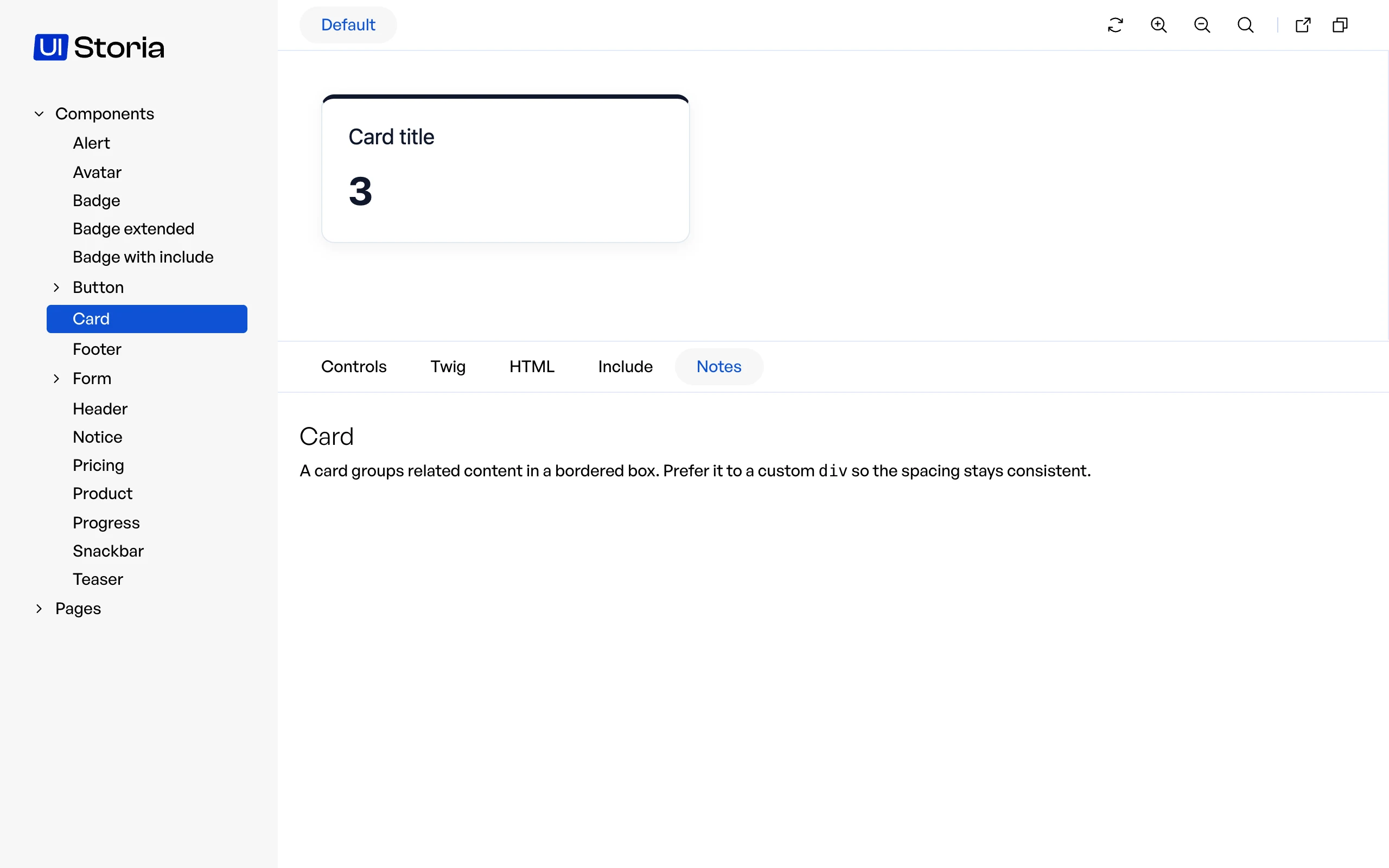
<p>A Markdown file next to the YAML file, with the same name, becomes the <strong>Notes</strong> tab of the view. Use it to document the component: when to use it, accessibility rules, links to the design.</p>
<pre><code translate="no">storia/components/button/button.yaml
storia/components/button/button.md</code></pre>
<p>The file is rendered as HTML, and the tab only appears when the file exists.</p>
<img src="/media/notes-tab.0bb861794068670091fde231393703f9.webp" alt="The Notes tab rendering the Markdown file of the Card component" loading="lazy" decoding="async" width="2560" height="1600">]]>
    </content>
  </entry>
  <entry xml:lang="en">
    <id>https://ui-storia.com/docs/live-reload/</id>
    <title>Live reload</title>
    <published>2026-10-17T13:32:35+00:00</published>
    <link href="https://ui-storia.com/docs/live-reload/" rel="alternate" type="text/html" />
    <content type="html">
      <![CDATA[<p>UI Storia comes with a live reload feature that automatically refreshes the preview when you modify your files.</p>
<video autoplay loop muted playsinline controls preload="metadata" poster="/media/live-reload-poster.webp" aria-label="Saving a template reloads the preview, saving a YAML file reloads the page">
    <source src="/media/live-reload.webm" type="video/webm">
    <source src="/media/live-reload.mp4" type="video/mp4">
</source></source></video>
<h2 id="requirements">Requirements</h2>
<p><code translate="no">storia:watch</code> runs a small native binary shipped with the bundle in <code translate="no">tools/watcher/bin/</code>. It uses the notifications of the operating system, so it is fast and light. The binary is chosen from your system:</p>
<table>
<thead>
<tr>
<th>System</th>
<th>Architectures</th>
</tr>
</thead>
<tbody>
<tr>
<td>macOS</td>
<td>arm64, amd64</td>
</tr>
<tr>
<td>Linux</td>
<td>arm64, amd64</td>
</tr>
<tr>
<td>Windows</td>
<td>one binary</td>
</tr>
</tbody>
</table>
<p>The command fails with an explicit error on any other operating system.</p>
<p>If your application runs in Docker, start the command inside the PHP container: the Linux binary is used there, and it watches the files as the container sees them.</p>
<pre><code class="language-bash hljs bash" translate="no">docker compose <span class="hljs-built_in">exec</span> php bin/console storia:watch</code></pre>
<p>The live reload is only available in the application. A <a href="/docs/export/">static export</a> has no live reload.</p>
<h2 id="starting-the-watcher">Starting the watcher</h2>
<p>Run the following command to start watching for file changes:</p>
<pre><code class="language-bash hljs bash" translate="no">bin/console storia:watch</code></pre>
<p>The watcher will display which directories it is monitoring and log every detected change:</p>
<pre><code translate="no">Watching [page]: /path/to/project/storia
Watching [iframe]: /path/to/project/templates
Watching [iframe]: /path/to/project/assets
Watching for changes… (Ctrl+C to stop)
[14:23:07] Change detected: /path/to/project/storia/components/badge.yaml (write) → page reload
[14:23:41] Change detected: /path/to/project/templates/ui/badge.html.twig (write) → iframe reload</code></pre>
<p>Press <code translate="no">Ctrl+C</code> to stop the watcher. The browser will automatically disconnect from the live reload stream.</p>
<h2 id="reload-behaviour">Reload behaviour</h2>
<p>UI Storia distinguishes between two types of changes:</p>
<ul>
<li><strong>Changes in the <code translate="no">storia/</code> folder</strong> (YAML files) trigger a <strong>full page reload</strong> — the menu and component metadata are refreshed.</li>
<li><strong>Changes in templates or assets</strong> trigger an <strong>iframe-only reload</strong> — the preview is refreshed without touching the page shell.</li>
</ul>
<h2 id="configuring-watched-paths">Configuring watched paths</h2>
<p>By default, UI Storia watches <code translate="no">templates/</code> and <code translate="no">assets/</code> for iframe reloads. You can customise this list in your configuration file:</p>
<pre><code class="language-yaml hljs yaml" translate="no"><span class="hljs-comment"># config/packages/iq2i_storia.yaml</span>

<span class="hljs-attr">iq2i_storia:</span>
    <span class="hljs-attr">watch:</span>
        <span class="hljs-bullet">-</span> <span class="hljs-string">'%kernel.project_dir%/templates'</span>
        <span class="hljs-bullet">-</span> <span class="hljs-string">'%kernel.project_dir%/assets'</span>
        <span class="hljs-bullet">-</span> <span class="hljs-string">'%kernel.project_dir%/src/Twig'</span></code></pre>
<p>The <code translate="no">storia/</code> folder (defined by <code translate="no">default_path</code>) is always watched for page reloads and does not need to be listed here.</p>]]>
    </content>
  </entry>
  <entry xml:lang="en">
    <id>https://ui-storia.com/docs/reference/</id>
    <title>Reference</title>
    <published>2026-10-17T13:32:35+00:00</published>
    <link href="https://ui-storia.com/docs/reference/" rel="alternate" type="text/html" />
    <content type="html">
      <![CDATA[<p>Everything on this page is <strong>stable</strong>: it only changes in a major version, see the <a href="/docs/upgrade/#compatibility-policy">compatibility policy</a>. A test compares the schema of the view files with a reference file, so a change cannot happen by accident.</p>
<h2 id="view-files">View files</h2>
<p>A view file is a YAML file in <code translate="no">storia/components</code> or <code translate="no">storia/pages</code>. The path of the file without its extension is the path of the view.</p>
<table>
<thead>
<tr>
<th>Key</th>
<th>Type</th>
<th>Description</th>
</tr>
</thead>
<tbody>
<tr>
<td><code translate="no">template</code></td>
<td>string</td>
<td>Twig template to render. Optional when a Twig file with the same name sits next to the YAML file.</td>
</tr>
<tr>
<td><code translate="no">component</code></td>
<td>string</td>
<td>Name of a Twig Component. Needs <code translate="no">symfony/ux-twig-component</code>.</td>
</tr>
<tr>
<td><code translate="no">form</code></td>
<td>string</td>
<td>Class of a Symfony form type. Needs <code translate="no">symfony/form</code>.</td>
</tr>
<tr>
<td><code translate="no">variants</code></td>
<td>map</td>
<td>The variations of the view, indexed by name.</td>
</tr>
<tr>
<td><code translate="no">options</code></td>
<td>map</td>
<td>Options of the form type. Form views only.</td>
</tr>
<tr>
<td><code translate="no">form_theme</code></td>
<td>string</td>
<td>Twig template used as form theme. Form views only.</td>
</tr>
<tr>
<td><code translate="no">include</code></td>
<td>string or list</td>
<td>Files whose <code translate="no">_definitions</code> anchors are available in this file.</td>
</tr>
<tr>
<td><code translate="no">extends</code></td>
<td>string</td>
<td>View file whose content is merged under this one.</td>
</tr>
<tr>
<td><code translate="no">_definitions</code></td>
<td>any</td>
<td>Anchors to share with <code translate="no">include</code>. Removed from the final configuration.</td>
</tr>
</tbody>
</table>
<p><code translate="no">template</code>, <code translate="no">component</code> and <code translate="no">form</code> cannot be used together.</p>
<h3 id="variants">Variants</h3>
<table>
<thead>
<tr>
<th>Key</th>
<th>Type</th>
<th>Views</th>
<th>Description</th>
</tr>
</thead>
<tbody>
<tr>
<td><code translate="no">name</code></td>
<td>string</td>
<td>all</td>
<td>Label displayed instead of the name deduced from the key.</td>
</tr>
<tr>
<td><code translate="no">args</code></td>
<td>map</td>
<td>template, component</td>
<td>Arguments passed to the template or props of the component.</td>
</tr>
<tr>
<td><code translate="no">blocks</code></td>
<td>map</td>
<td>component</td>
<td>HTML content of the blocks of the component, printed as is.</td>
</tr>
<tr>
<td><code translate="no">options</code></td>
<td>map</td>
<td>form</td>
<td>Form options for this variant, merged over the <code translate="no">options</code> of the view.</td>
</tr>
<tr>
<td><code translate="no">with_errors</code></td>
<td>bool</td>
<td>form</td>
<td>Displays a validation error.</td>
</tr>
</tbody>
</table>
<p>A form view always has the variants <code translate="no">default</code>, <code translate="no">disabled</code> and <code translate="no">error</code>. A variant with the same name replaces the automatic one.</p>
<h3 id="tags">Tags</h3>
<p>Available in <code translate="no">args</code>, <code translate="no">blocks</code> and form <code translate="no">options</code>. See <a href="/docs/data/">Data</a>.</p>
<table>
<thead>
<tr>
<th>Tag</th>
<th>Description</th>
</tr>
</thead>
<tbody>
<tr>
<td><code translate="no">!data name</code></td>
<td>Value of a data file, a dotted path inside it, or the result of <code translate="no">Class::method</code>.</td>
</tr>
<tr>
<td><code translate="no">!data { ref: name, with: { ... } }</code></td>
<td>The same, with some values replaced.</td>
</tr>
<tr>
<td><code translate="no">!repeat { count: n, item: ... }</code></td>
<td>A list of <code translate="no">n</code> items, <code translate="no">{i}</code> is the position of the item.</td>
</tr>
<tr>
<td><code translate="no">!lorem 12</code>, <code translate="no">!lorem 2 sentences</code>, <code translate="no">!lorem 1 paragraph</code></td>
<td>Deterministic placeholder text.</td>
</tr>
</tbody>
</table>
<h3 id="data-files">Data files</h3>
<p>Files of <code translate="no">storia/data</code> are not views. They hold any YAML value, referenced by their path without extension.</p>
<h2 id="bundle-configuration">Bundle configuration</h2>
<pre><code class="language-yaml hljs yaml" translate="no"><span class="hljs-attr">iq2i_storia:</span>
    <span class="hljs-attr">default_path:</span> <span class="hljs-string">'%kernel.project_dir%/storia'</span>
    <span class="hljs-attr">enabled:</span> <span class="hljs-string">~</span>          <span class="hljs-comment"># default: kernel.debug</span>
    <span class="hljs-attr">watch:</span>              <span class="hljs-comment"># paths watched for iframe reloads</span>
        <span class="hljs-bullet">-</span> <span class="hljs-string">'%kernel.project_dir%/assets'</span>
        <span class="hljs-bullet">-</span> <span class="hljs-string">'%kernel.project_dir%/templates'</span>
    <span class="hljs-attr">export:</span>
        <span class="hljs-attr">output_dir:</span> <span class="hljs-string">'%kernel.project_dir%/var/storia/export'</span>
        <span class="hljs-attr">public_dir:</span> <span class="hljs-string">'%kernel.project_dir%/public'</span>
        <span class="hljs-attr">assets:</span> <span class="hljs-string">[]</span>
    <span class="hljs-attr">test:</span>
        <span class="hljs-attr">snapshot_path:</span> <span class="hljs-string">'%kernel.project_dir%/tests/storia/snapshots'</span></code></pre>
<h2 id="commands">Commands</h2>
<table>
<thead>
<tr>
<th>Command</th>
<th>Options</th>
<th>Description</th>
</tr>
</thead>
<tbody>
<tr>
<td><code translate="no">storia:watch</code></td>
<td></td>
<td>Reloads the preview when a file changes.</td>
</tr>
<tr>
<td><code translate="no">storia:export [output-dir]</code></td>
<td></td>
<td>Exports the catalog as a static website.</td>
</tr>
<tr>
<td><code translate="no">storia:test</code></td>
<td><code translate="no">--filter</code>, <code translate="no">--update</code>, <code translate="no">--no-snapshots</code>, <code translate="no">--snapshot-path</code></td>
<td>Renders every variant and compares it with its snapshot.</td>
</tr>
<tr>
<td><code translate="no">storia:list</code></td>
<td><code translate="no">--format=txt\|json</code>, <code translate="no">--filter</code></td>
<td>Lists the views and their variants.</td>
</tr>
<tr>
<td><code translate="no">storia:render view variant</code></td>
<td><code translate="no">--format=html\|twig\|include</code></td>
<td>Prints what a variant renders.</td>
</tr>
</tbody>
</table>
<h2 id="phpunit">PHPUnit</h2>
<table>
<thead>
<tr>
<th>Class</th>
<th>Description</th>
</tr>
</thead>
<tbody>
<tr>
<td><code translate="no">IQ2i\StoriaBundle\Test\PHPUnit\StoriaVariants</code></td>
<td>Data provider listing the variants of the catalog.</td>
</tr>
<tr>
<td><code translate="no">IQ2i\StoriaBundle\Test\PHPUnit\StoriaTestCaseTrait</code></td>
<td>Assertions to render a variant and compare it with its snapshot.</td>
</tr>
</tbody>
</table>]]>
    </content>
  </entry>
  <entry xml:lang="en">
    <id>https://ui-storia.com/docs/testing/</id>
    <title>Testing</title>
    <published>2026-10-17T13:32:35+00:00</published>
    <link href="https://ui-storia.com/docs/testing/" rel="alternate" type="text/html" />
    <content type="html">
      <![CDATA[<p>Every variant is a test case: the integrator writes the variants, the developer overrides an anonymous component with a PHP class, and <code translate="no">storia:test</code> catches the regressions.</p>
<pre><code class="language-bash hljs bash" translate="no">bin/console storia:<span class="hljs-built_in">test</span></code></pre>
<p>The command renders every variant of every component and page, then compares the HTML with its snapshot:</p>
<pre><code translate="no">✓ components/badge:default
≠ components/badge:large
✗ components/product:expensive
    Twig\Error\RuntimeError: Variable "price" does not exist.

41 variants, 39 passed, 0 new, 0 updated, 2 failed</code></pre>
<ul>
<li><code translate="no">✗</code> the variant cannot be rendered (Twig or PHP error). It always fails the command.</li>
<li><code translate="no">≠</code> the rendering differs from the snapshot. A diff is shown (install <code translate="no">sebastian/diff</code> to get it) and the command fails.</li>
<li><code translate="no">+</code> the variant has no snapshot yet: it is written and the command does not fail, except in CI (see below).</li>
<li><code translate="no">↻</code> the snapshot was rewritten because of <code translate="no">--update</code>.</li>
<li><code translate="no">?</code> a view defines no variant, or a snapshot has no variant any more: nothing is tested. A view without variant fails the command in CI.</li>
</ul>
<img src="/media/testing-output.a3c36ef693aedeb096ac2054b3a79071.webp" alt="storia:test on a passing run, a changed snapshot with its diff and a variant that fails to render" loading="lazy" decoding="async" width="2560" height="2360">
<p>The exit code is <code translate="no">1</code> as soon as one variant fails, <code translate="no">0</code> otherwise, so the command can be used as is in a CI job.
When the <code translate="no">CI</code> environment variable is set (GitHub Actions and GitLab CI set it), or with <code translate="no">--ci</code>, a missing snapshot is an error instead of being written: a file written on a runner is lost, and the variant would never be compared.</p>
<pre><code class="language-yaml hljs yaml" translate="no"><span class="hljs-comment"># .gitlab-ci.yml</span>

<span class="hljs-attr">storia:</span>
    <span class="hljs-attr">stage:</span> <span class="hljs-string">test</span>
    <span class="hljs-attr">script:</span>
        <span class="hljs-bullet">-</span> <span class="hljs-string">composer</span> <span class="hljs-string">install</span> <span class="hljs-string">--no-interaction</span> <span class="hljs-string">--prefer-dist</span>
        <span class="hljs-bullet">-</span> <span class="hljs-string">php</span> <span class="hljs-string">bin/console</span> <span class="hljs-string">storia:test</span></code></pre>
<h2 id="snapshots">Snapshots</h2>
<p>A snapshot is the HTML of one variant, without the preview page around it, stored in <code translate="no">tests/storia/snapshots/&lt;view&gt;/&lt;variant&gt;.html</code>. Commit them: they are reviewed in your merge requests like any other file.
Only line endings and trailing spaces are normalized, nothing else is reformatted.
The HTML also depends on the rendering stack: upgrading Symfony or Twig can change a form theme or an attribute, review the diff and accept it with <code translate="no">--update</code>.</p>
<p>Snapshots are never rewritten silently. When a change is intended, accept it explicitly:</p>
<pre><code class="language-bash hljs bash" translate="no">bin/console storia:<span class="hljs-built_in">test</span> --update</code></pre>
<p>A snapshot whose variant no longer exists is reported with <code translate="no">?</code> but does not fail the command; delete the file.</p>
<p>Snapshots can only be stable if the rendering is. <code translate="no">!repeat</code> and <code translate="no">!lorem</code> are deterministic, and the CSRF protection of a form view is disabled by UI Storia, so no <code translate="no">_token</code> ends up in a snapshot.
A PHP data provider is yours to make deterministic: seed Faker, avoid <code translate="no">new DateTime()</code> and random values, and give versioned asset URLs a stable value in the test environment. A variant that cannot be stable can be left out with <code translate="no">--no-snapshots</code>.</p>
<pre><code class="language-yaml hljs yaml" translate="no"><span class="hljs-comment"># config/packages/iq2i_storia.yaml</span>

<span class="hljs-attr">iq2i_storia:</span>
    <span class="hljs-attr">test:</span>
        <span class="hljs-attr">snapshot_path:</span> <span class="hljs-string">'%kernel.project_dir%/tests/storia/snapshots'</span></code></pre>
<h2 id="options">Options</h2>
<table>
<thead>
<tr>
<th>Option</th>
<th>Description</th>
</tr>
</thead>
<tbody>
<tr>
<td><code translate="no">--filter=&lt;text&gt;</code></td>
<td>Only test the views or variants whose <code translate="no">view</code> or <code translate="no">view:variant</code> name contains the text</td>
</tr>
<tr>
<td><code translate="no">--update</code></td>
<td>Rewrite the snapshots that differ</td>
</tr>
<tr>
<td><code translate="no">--no-snapshots</code></td>
<td>Only check that every variant renders</td>
</tr>
<tr>
<td><code translate="no">--ci</code></td>
<td>Fail on a missing snapshot instead of writing it (default when the <code translate="no">CI</code> environment variable is set)</td>
</tr>
<tr>
<td><code translate="no">--snapshot-path=&lt;dir&gt;</code></td>
<td>Use another snapshot directory</td>
</tr>
<tr>
<td><code translate="no">-v</code></td>
<td>Show the stack trace of the errors</td>
</tr>
</tbody>
</table>
<h2 id="phpunit">PHPUnit</h2>
<p>For custom assertions, expose the variants as a data provider and use the <code translate="no">StoriaTestCaseTrait</code> in a <code translate="no">KernelTestCase</code>:</p>
<pre><code class="language-php hljs php" translate="no"><span class="hljs-keyword">use</span> <span class="hljs-title">IQ2i</span>\<span class="hljs-title">StoriaBundle</span>\<span class="hljs-title">Test</span>\<span class="hljs-title">PHPUnit</span>\<span class="hljs-title">StoriaTestCaseTrait</span>;
<span class="hljs-keyword">use</span> <span class="hljs-title">IQ2i</span>\<span class="hljs-title">StoriaBundle</span>\<span class="hljs-title">Test</span>\<span class="hljs-title">PHPUnit</span>\<span class="hljs-title">StoriaVariants</span>;
<span class="hljs-keyword">use</span> <span class="hljs-title">PHPUnit</span>\<span class="hljs-title">Framework</span>\<span class="hljs-title">Attributes</span>\<span class="hljs-title">DataProvider</span>;
<span class="hljs-keyword">use</span> <span class="hljs-title">Symfony</span>\<span class="hljs-title">Bundle</span>\<span class="hljs-title">FrameworkBundle</span>\<span class="hljs-title">Test</span>\<span class="hljs-title">KernelTestCase</span>;

<span class="hljs-keyword">final</span> <span class="hljs-class"><span class="hljs-keyword">class</span> <span class="hljs-title">StoriaTest</span> <span class="hljs-keyword">extends</span> <span class="hljs-title">KernelTestCase</span>
</span>{
    <span class="hljs-keyword">use</span> <span class="hljs-title">StoriaTestCaseTrait</span>;

    <span class="hljs-comment">#[DataProvider('provideVariants')]</span>
    <span class="hljs-keyword">public</span> <span class="hljs-function"><span class="hljs-keyword">function</span> <span class="hljs-title">testVariant</span><span class="hljs-params">(string $path, string $variant)</span>: <span class="hljs-title">void</span>
    </span>{
        $view = <span class="hljs-keyword">$this</span>-&gt;assertVariantRenders($path, $variant);

        <span class="hljs-keyword">self</span>::assertStringNotContainsString(<span class="hljs-string">'TODO'</span>, (string) $view-&gt;getHtmlContent());
    }

    <span class="hljs-keyword">public</span> <span class="hljs-keyword">static</span> <span class="hljs-function"><span class="hljs-keyword">function</span> <span class="hljs-title">provideVariants</span><span class="hljs-params">()</span>: <span class="hljs-title">array</span>
    </span>{
        <span class="hljs-keyword">return</span> StoriaVariants::fromDirectory(<span class="hljs-keyword">__DIR__</span>.<span class="hljs-string">'/../storia'</span>);
    }
}</code></pre>
<p><code translate="no">StoriaVariants::fromDirectory()</code> reads the YAML files without booting the kernel, as a data provider runs before any test. The <code translate="no">StoriaVariants::provide()</code> method can also be used with <code translate="no">#[DataProviderExternal]</code>: it reads the directory from the <code translate="no">STORIA_PATH</code> environment variable, or <code translate="no">./storia</code>.
<code translate="no">assertVariantMatchesSnapshot()</code> compares a variant with its snapshot.</p>
<p>Screenshots (Panther) and accessibility checks are not covered yet.</p>]]>
    </content>
  </entry>
  <entry xml:lang="en">
    <id>https://ui-storia.com/docs/upgrade/</id>
    <title>Upgrade</title>
    <published>2026-10-17T13:32:35+00:00</published>
    <link href="https://ui-storia.com/docs/upgrade/" rel="alternate" type="text/html" />
    <content type="html">
      <![CDATA[<h2 id="supported-versions">Supported versions</h2>
<table>
<thead>
<tr>
<th>UI Storia</th>
<th>PHP</th>
<th>Symfony</th>
</tr>
</thead>
<tbody>
<tr>
<td>1.x</td>
<td>&gt;= 8.3</td>
<td>6.4, 7.x and 8.x</td>
</tr>
</tbody>
</table>
<p>The test suite runs in CI on the lowest and the highest supported versions of PHP and Symfony, and on the next Symfony version in development.</p>
<h2 id="compatibility-policy">Compatibility policy</h2>
<p>UI Storia follows <a href="https://semver.org/" rel="noopener noreferrer">Semantic Versioning</a>. Within a major version, what is <strong>stable</strong> keeps working, and what is <strong>internal</strong> can change in any release.</p>
<h3 id="what-is-stable">What is stable</h3>
<ul>
<li>The YAML format of the view files and the data files, as listed in the <a href="/docs/reference/">reference</a>.</li>
<li>The <code translate="no">iq2i_storia</code> configuration of the bundle.</li>
<li>The commands and their arguments and options: <code translate="no">storia:watch</code>, <code translate="no">storia:export</code>, <code translate="no">storia:test</code>, <code translate="no">storia:list</code>, <code translate="no">storia:render</code>. The JSON printed by <code translate="no">storia:list --format=json</code> only gets new keys.</li>
<li>The PHPUnit helpers <code translate="no">IQ2i\StoriaBundle\Test\PHPUnit\StoriaVariants</code> and <code translate="no">IQ2i\StoriaBundle\Test\PHPUnit\StoriaTestCaseTrait</code>.</li>
<li>The templates and blocks you can override, such as <code translate="no">iframe.html.twig</code>.</li>
</ul>
<h3 id="what-is-internal">What is internal</h3>
<p>Every other class of the bundle (builders, resolvers, exporter, renderer, controllers, DTOs) is marked <code translate="no">@internal</code>. Do not extend or call it: it can change in a minor or a patch release. The HTML of the UI Storia interface and its CSS classes are internal too.</p>
<h3 id="deprecations-and-support">Deprecations and support</h3>
<ul>
<li>A feature is deprecated in a minor version, with a deprecation notice that tells what to use instead, and removed in the next major version.</li>
<li>Dropping the support of a PHP or Symfony version is done in a minor version, never in a patch version. A PHP version is supported until its end of life, a Symfony version until the end of its bug fixes.</li>
<li>A new snapshot format would be a major change: the snapshots written by <code translate="no">storia:test</code> are plain HTML files, normalized in the same way for the whole major version.</li>
</ul>
<h2 id="upgrade-from-0-5-to-0-6">Upgrade from 0.5 to 0.6</h2>
<h3 id="ui-storia-is-enabled-with-kernel-debug-only">UI Storia is enabled with <code translate="no">kernel.debug</code> only</h3>
<p>The bundle used to be always enabled. It is now enabled when <code translate="no">kernel.debug</code> is true, as the Symfony profiler. If you expose UI Storia on an environment that runs with debug disabled (a staging environment for example), force it:</p>
<pre><code class="language-yaml hljs yaml" translate="no"><span class="hljs-comment"># config/packages/staging/iq2i_storia.yaml</span>
<span class="hljs-attr">iq2i_storia:</span>
    <span class="hljs-attr">enabled:</span> <span class="hljs-literal">true</span></code></pre>
<p>Nothing changes in <code translate="no">dev</code> and <code translate="no">test</code>. The commands work in every environment.</p>
<h3 id="iq2i-storia-menu-is-removed"><code translate="no">iq2i_storia_menu()</code> is removed</h3>
<p>The sidebar is built by the bundle. If you override <code translate="no">view.html.twig</code> and call this function, copy the sidebar markup from the new template instead. Most projects only override <code translate="no">iframe.html.twig</code>, which is not affected.</p>
<h3 id="use-data-to-call-php">Use <code translate="no">!data</code> to call PHP</h3>
<p>A bare <code translate="no">Class::method</code> string in an argument is still resolved, with a deprecation notice. Replace it with the tag:</p>
<pre><code class="language-yaml hljs yaml" translate="no"><span class="hljs-comment"># before</span>
<span class="hljs-attr">product:</span> <span class="hljs-string">App\Factory\ProductFactory::createDefault</span>

<span class="hljs-comment"># after</span>
<span class="hljs-attr">product:</span> <span class="hljs-type">!data</span> <span class="hljs-string">App\Factory\ProductFactory::createDefault</span></code></pre>
<h3 id="symfony-form-and-symfony-ux-twig-component-are-optional"><code translate="no">symfony/form</code> and <code translate="no">symfony/ux-twig-component</code> are optional</h3>
<p>Both are suggested packages. Install them to preview form types and Twig Components:</p>
<pre><code class="language-bash hljs bash" translate="no">composer require symfony/form symfony/ux-twig-component</code></pre>
<h3 id="form-variants">Form variants</h3>
<p>Form views accept custom variants with <code translate="no">options</code> and <code translate="no">with_errors</code>. The options of a variant now win over the global <code translate="no">options</code> of the file. If you relied on a global option overriding an automatic variant, for example <code translate="no">disabled: false</code> in <code translate="no">options</code>, move it to a declared variant.</p>
<h3 id="snapshots">Snapshots</h3>
<p><code translate="no">storia:test</code> writes its snapshots in <code translate="no">tests/storia/snapshots</code>. Commit them, and set <code translate="no">iq2i_storia.test.snapshot_path</code> to use another folder. Run <code translate="no">storia:test</code> in your CI: a view without variants and a missing snapshot make the command fail there.</p>
<h3 id="variant-names">Variant names</h3>
<p>The <code translate="no">name</code> key of a variant is now used as the label of its tab. Remove it from your files if you do not want the label to change.</p>
<h3 id="blocks-are-plain-html">Blocks are plain HTML</h3>
<p>The <code translate="no">blocks</code> of a component are printed as is and are no longer compiled as Twig. Move the logic to an argument or to the component template:</p>
<pre><code class="language-yaml hljs yaml" translate="no"><span class="hljs-comment"># before</span>
<span class="hljs-attr">blocks:</span>
    <span class="hljs-attr">content:</span> <span class="hljs-string">'&lt;strong&gt;<span class="hljs-template-variable">{{ "now"|date("Y") }}</span>&lt;/strong&gt;'</span>

<span class="hljs-comment"># after</span>
<span class="hljs-attr">blocks:</span>
    <span class="hljs-attr">content:</span> <span class="hljs-string">'&lt;strong&gt;2026&lt;/strong&gt;'</span></code></pre>]]>
    </content>
  </entry>
  <entry xml:lang="en">
    <id>https://ui-storia.com/docs/user-interface/</id>
    <title>The interface</title>
    <published>2026-10-17T13:32:35+00:00</published>
    <link href="https://ui-storia.com/docs/user-interface/" rel="alternate" type="text/html" />
    <content type="html">
      <![CDATA[<p>Open the route you registered (<code translate="no">/storia</code> by default) to get the catalog of your interfaces.</p>
<img src="/media/ui-overview.f1eeef797434a062940e33b4ce70d4cb.webp" alt="The UI Storia interface: sidebar, variants, preview and code tabs" loading="lazy" decoding="async" width="2560" height="1600">
<h2 id="sidebar">Sidebar</h2>
<p>The sidebar lists the views found in the <code translate="no">storia/components</code> and <code translate="no">storia/pages</code> folders. Sub-folders become collapsible groups. Labels are deduced from the file names: <code translate="no">buttonGroup.yaml</code> is displayed as "Button group".</p>
<p>Drag the separator between the sidebar and the content to resize it.</p>
<h2 id="variants">Variants</h2>
<p>The tabs on top of the preview are the variants of the current view. The selected variant is part of the URL (<code translate="no">?variant=large</code>), so you can share a link to it.</p>
<h2 id="preview-actions">Preview actions</h2>
<p>The actions on the right of the variants act on the preview:</p>
<table>
<thead>
<tr>
<th>Action</th>
<th>What it does</th>
</tr>
</thead>
<tbody>
<tr>
<td>Refresh</td>
<td>Reloads the preview</td>
</tr>
<tr>
<td>Zoom in</td>
<td>Enlarges the preview</td>
</tr>
<tr>
<td>Zoom out</td>
<td>Shrinks the preview</td>
</tr>
<tr>
<td>Zoom 100%</td>
<td>Resets the zoom</td>
</tr>
<tr>
<td>Iframe</td>
<td>Opens the preview alone in a new tab, without the interface</td>
</tr>
<tr>
<td>Copy</td>
<td>Copies the address of the current page</td>
</tr>
</tbody>
</table>
<p>The preview is rendered in an iframe, with the styles and scripts of your application: see <a href="/docs/installation/#load-your-styles-and-scripts">Load your styles and scripts</a>. Drag the vertical separator on its right to test your component at another width.</p>
<video autoplay loop muted playsinline controls preload="metadata" poster="/media/interface-poster.webp" aria-label="Zooming, resizing the preview, browsing the code tabs and switching variant in UI Storia">
    <source src="/media/interface.webm" type="video/webm">
    <source src="/media/interface.mp4" type="video/mp4">
</source></source></video>
<h2 id="code-tabs">Code tabs</h2>
<p>Under the preview, the tabs show what is rendered for the current variant. Each code block has a button to copy it.</p>
<table>
<thead>
<tr>
<th>Tab</th>
<th>Content</th>
</tr>
</thead>
<tbody>
<tr>
<td>Controls</td>
<td>Edit the arguments of the variant and see the result, see <a href="/docs/controls/">Controls</a></td>
</tr>
<tr>
<td>Twig</td>
<td>The Twig source of the template or component</td>
</tr>
<tr>
<td>HTML</td>
<td>The HTML generated by the variant</td>
</tr>
<tr>
<td>Include</td>
<td>Code to paste in your templates to use the component with the arguments of the variant (components only)</td>
</tr>
<tr>
<td>Notes</td>
<td>The Markdown file next to the YAML file, see <a href="/docs/interfaces/#notes">Notes</a></td>
</tr>
</tbody>
</table>
<img src="/media/ui-include-tab.ed062932ba01d7c141ebc3629ed0b3f3.webp" alt="The Include tab, with the code to paste in a template" loading="lazy" decoding="async" width="2560" height="1600">
<p>The Controls, Include and Notes tabs only appear when the view has something to show in them. Drag the horizontal separator between the preview and the tabs to give more room to one or the other.</p>
<h2 id="views-without-variants">Views without variants</h2>
<p>A view that defines no variant is listed in the sidebar, but there is nothing to preview. Add at least one variant: <code translate="no">storia:test</code> reports a view without variants as an error in CI.</p>]]>
    </content>
  </entry>
  <entry xml:lang="en">
    <id>https://ui-storia.com/docs/why-not-storybook/</id>
    <title>Why not Storybook?</title>
    <published>2026-10-17T13:32:35+00:00</published>
    <link href="https://ui-storia.com/docs/why-not-storybook/" rel="alternate" type="text/html" />
    <content type="html">
      <![CDATA[<p>Storybook and Fractal are excellent tools, built for JavaScript front-ends. UI Storia answers a narrower question: how do you document and test the Twig components of a Symfony application, with the people who write them?</p>
<h2 id="what-a-port-of-twig-breaks">What a port of Twig breaks</h2>
<p>Tools that run on Node cannot call your PHP application. To display a Twig template, they need a JavaScript implementation of Twig, or a bridge to the server. Components then diverge from what your application renders:</p>
<ul>
<li>Symfony UX components (<code translate="no">&lt;twig:Button&gt;</code>), <code translate="no">{% props %}</code>, and anonymous components are not plain Twig.</li>
<li>Filters, functions and tests written in PHP, or coming from Symfony bundles (<code translate="no">path()</code>, <code translate="no">asset()</code>, <code translate="no">trans</code>, <code translate="no">ux_icon()</code>), do not exist on the JavaScript side.</li>
<li>Form themes and Symfony forms need the PHP form component.</li>
<li>Each new Twig feature must be supported by the port before you can use it.</li>
</ul>
<p>UI Storia renders the templates of your project with your Twig environment. If it works in the catalog, it works in the application.</p>
<h2 id="comparison">Comparison</h2>
<table>
<thead>
<tr>
<th></th>
<th>UI Storia</th>
<th>Storybook</th>
<th>Fractal</th>
</tr>
</thead>
<tbody>
<tr>
<td>Rendering of Twig</td>
<td>Your Symfony Twig environment</td>
<td>JavaScript port or bridge to a server</td>
<td>JavaScript Twig implementation</td>
</tr>
<tr>
<td>Who writes the stories</td>
<td>Integrators, in YAML, without PHP or JS</td>
<td>Developers, in JavaScript</td>
<td>Integrators and developers, in YAML or JS configuration</td>
</tr>
<tr>
<td>Symfony integration</td>
<td>Twig Components, Symfony forms, form themes, services as data providers</td>
<td>Through extra layers</td>
<td>None</td>
</tr>
<tr>
<td>Runtime</td>
<td>PHP, inside your project</td>
<td>Node</td>
<td>Node</td>
</tr>
<tr>
<td>Maintenance</td>
<td>Follows your Symfony and Twig versions</td>
<td>A second toolchain to keep in sync</td>
</tr>
<tr>
<td>Tests</td>
<td>One test per variant with <code translate="no">storia:test</code></td>
<td>Test runner and add-ons</td>
<td>Not included</td>
</tr>
</tbody>
</table>
<p>Check the current state of each tool before choosing: they evolve, and this table describes the general approach of each.</p>
<h2 id="when-another-tool-is-a-better-fit">When another tool is a better fit</h2>
<ul>
<li>Your design system is written in React, Vue or Web Components: use Storybook.</li>
<li>You want visual regression testing of screenshots, or interaction tests: UI Storia only compares HTML.</li>
<li>Your front-end is not a Symfony application.</li>
</ul>]]>
    </content>
  </entry>
  <entry xml:lang="en">
    <id>https://ui-storia.com/docs/workflow/</id>
    <title>Workflow</title>
    <published>2026-10-17T13:32:35+00:00</published>
    <link href="https://ui-storia.com/docs/workflow/" rel="alternate" type="text/html" />
    <content type="html">
      <![CDATA[<p>UI Storia is built for a team where <strong>integrators</strong> and <strong>developers</strong> share the same templates: your design system lives in your Symfony project, built by your integrators.</p>
<img src="/media/workflow.93a68de481fb10d18ad7558866bac644.svg" alt="The integrator writes the component and its variants, the developer adds logic and tests, the designer reviews the export" loading="lazy" decoding="async" width="0" height="0">
<h2 id="integrator-first-then-developer">Integrator first, then developer</h2>
<ol>
<li><strong>From the mockup to a component.</strong> The integrator creates an anonymous component in <code translate="no">templates/components</code>, with Twig and CSS only. No PHP, no controller, no database.</li>
<li><strong>Variants.</strong> They describe each state of the mockup (default, large, disabled, empty, long text...) as a variant in <code translate="no">storia/components</code>. The catalog now documents the component and can be reviewed by the designer.</li>
<li><strong>Real data.</strong> When the component needs structured data, they write it once in <code translate="no">storia/data</code>, with <code translate="no">!data</code>, <code translate="no">!repeat</code> and <code translate="no">!lorem</code>.</li>
<li><strong>Behavior in PHP, only when needed.</strong> When the component needs logic, the developer replaces the anonymous template with a Twig Component class of the same name. The template and the variants do not change: they are the specification.</li>
<li><strong>A safety net.</strong> <code translate="no">storia:test</code> renders every variant and compares it with its snapshot. Run it in CI: a change of a component that alters another one shows up in the diff of the snapshots.</li>
</ol>
<h2 id="why-it-works">Why it works</h2>
<ul>
<li>The integrator never leaves Twig and YAML, but works with the real templates of the application, so what they validate is what ships.</li>
<li>The developer gets a catalog of every state of every component, without writing stories.</li>
<li>The snapshots are plain HTML files in <code translate="no">tests/storia/snapshots</code>, reviewed in the same pull request as the change.</li>
</ul>
<h2 id="in-practice">In practice</h2>
<table>
<thead>
<tr>
<th>Who</th>
<th>Writes</th>
<th>Checks</th>
</tr>
</thead>
<tbody>
<tr>
<td>Integrator</td>
<td><code translate="no">templates/components/*.html.twig</code>, <code translate="no">storia/**/*.yaml</code></td>
<td>The preview, with <code translate="no">storia:watch</code></td>
</tr>
<tr>
<td>Developer</td>
<td>Component classes, data providers, PHPUnit tests</td>
<td><code translate="no">storia:test</code> locally and in CI</td>
</tr>
<tr>
<td>Designer</td>
<td>Nothing</td>
<td>The <a href="/docs/export/">static export</a> published on each merge request</td>
</tr>
</tbody>
</table>]]>
    </content>
  </entry>
</feed>